From idea to market-ready product, our NPI solutions make every stage easier, faster. Discover How We Help

Views: 222 Author: Tomorrow Publish Time: 2025-12-12 Origin: Site


Content Menu
● Understanding CNC Turning Machines
● Preparing for CNC Turning Setup
>> 1. Machine inspection and cleaning
>> 2. Review part drawing and machining plan
>> 3. Gather tools and equipment
● Installing the Workpiece Securely
>> 1. Select appropriate workholding.
>> 3. Center and align the part.
>> 4. Secure clamping pressure.
>> 5. Check tailstock engagement.
● Setting Up and Calibrating Tools
>> 1. Install tool holders and verify seating.
>> 4. Set tool nose radius and type.
>> 5. Label tool numbers clearly.
● Coordinate System and Zero Setting
>> 1. Establish machine home position
>> 2. Determine work coordinate zero (G54 or other)
>> 4. Input and double-check spindle direction
● Entering and Verifying CNC Program
>> 1. Input or upload the program.
>> 2. Simulate program (if available).
>> 4. Set limits and safe zones.
>> 5. Document version control.
● Performing the First Trial Run
● Optimizing the CNC Turning Process
>> Optimize cutting parameters
>> Manage vibration and chatter
● Common Errors During CNC Lathe Setup
● Advanced Tips for Improved Precision
>> 1. Use high-quality tool holders.
>> 2. Implement automated tool length measurement.
>> 3. Apply consistent torque when clamping tools.
>> 4. Monitor temperature fluctuations.
● FAQ
>> 1. What is the difference between CNC turning and CNC milling?
>> 2. How often should CNC turning tools be replaced?
>> 3. Can beginners operate a CNC turning machine?
>> 4. Which materials can be machined on CNC turning machines?
>> 5. How do I minimize vibration or chatter during turning?
Setting up a CNC turning machine is one of the most important processes in precision manufacturing. Accurate setup ensures every operation—from rough turning to finishing—produces high-quality parts with minimal error. A well-set CNC lathe not only enhances efficiency but also prolongs tool life and prevents costly machine downtime.
This comprehensive guide will walk you through the entire process of setting a CNC turning machine properly, from understanding machine components and preparing the workspace to programming and performing the first trial run. Whether you are a new operator or a seasoned machinist, mastering these procedures will greatly improve your machining results.

A CNC turning machine, or CNC lathe, operates by rotating a workpiece while fixed cutting tools remove material. Unlike milling centers, which use rotating tools, turning machines rely on the rotation of the workpiece itself. The setup is ideal for cylindrical or symmetrical components such as shafts, pins, bushings, and threaded parts.
CNC lathes may be two-axis or multi-axis (up to 9 axes for complex parts). The basic axes include:
- Z-axis: Controls movement of the cutting tool along the axis of the spindle.
- X-axis: Controls radial movement of the tool.
- C-axis (if available): Facilitates milling or drilling on the face or around the diameter.
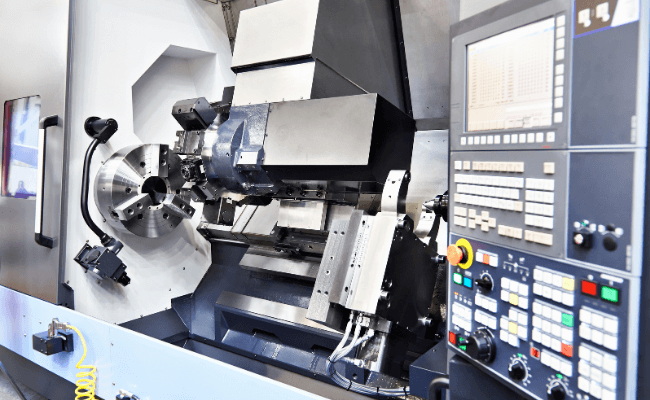
The key sections of a CNC turning machine include:
- Headstock: Houses the main spindle that holds and rotates the workpiece.
- Tailstock: Provides additional support during long part machining.
- Turret or Tool Post: Holds multiple tools that can be indexed automatically.
- Bed and carriage: Provide support and rigidity to resist cutting forces.
- Control panel: Used to input commands, run programs, and monitor operation.
Understanding these sections and their functions is essential before any setup begins.
Before touching the control buttons, preparation is the first crucial step. Poor preparation can lead to misalignment, tool crashes, or inaccurate machining.
Check that the machine is free from chips, oil residues, and previous setup debris. Inspect lubrication levels and coolant supply. Verify that all guards and protective shields are properly fitted and operational.
A clean and lubricated machine not only reduces wear but also ensures heat dissipation during cutting.
Study the engineering drawing thoroughly. Identify the dimensions, tolerances, machining features (such as threads, tapers, or grooves), and surface finish requirements. Cross-check that the machine capabilities and tooling inventory meet project needs.
Prepare all measuring instruments (such as calipers, micrometers, dial indicators), chuck keys, torque wrenches, and material stock before you start. Organizing your workspace saves significant time later and prevents accidental tool damage.
Always wear protective eyewear, safety shoes, and ear protection. Tie up loose clothing and hair. Familiarize yourself with the position of the emergency stop switch. Never operate without proper authorization or training.
Correct workholding determines whether a machining job succeeds or fails. Even the most accurate program cannot compensate for a poorly clamped part.
Choose between a 3-jaw chuck, 4-jaw chuck, collet chuck, or faceplate depending on the part geometry. A 3-jaw chuck provides quick centering for round parts, while a 4-jaw allows independent adjustment for irregular shapes.
Any dirt between the jaws and part can cause runout. Wipe all surfaces with a clean cloth before installation.
Use a dial indicator to ensure the workpiece runs true. Radial runout should be within acceptable tolerance before machining begins.
Apply consistent torque when tightening. Too loose may slip; too tight may deform thin-walled parts.
For long shafts, support the opposite end with the live center on the tailstock. Adjust pressure to prevent part deflection without over-tightening.
The next stage is tooling setup. The correct alignment and calibration of each tool determine dimensional accuracy and surface quality.
Place tool blocks firmly in the turret positions. Avoid dirt or burrs under tool holders.
Fit cutting inserts, boring bars, threading tools, and parting blades suitable for the job material. Ensure cutting edges face the right direction relative to spindle rotation.
Use a tool presetter to measure tool lengths, or manually touch off each tool to the face or diameter of the part. Enter the offsets into the control panel (typically under “Tool Geometry” or “Tool Offset” pages).
Input tool tip geometry values such as radius and orientation (left-hand, right-hand, or neutral). This allows the CNC controller to compensate for the exact tool path automatically.
Create a systematic tool list corresponding to program calls (e.g., T0101 for a turning tool, T0202 for a facing tool). This prevents identification errors later.
CNC turning operations rely heavily on precise coordinate system setup.
This is set by the manufacturer and should never be changed. When you reference or power on the machine, it returns to this home point to synchronize all axis movements.
Choose a logical reference point—usually the face of the part (Z0) and the centerline (X0). Move the first tool carefully to touch these surfaces and record offset values in the control.
After setting all offsets, jog each tool near the workpiece and check clearance. This ensures no tool will unexpectedly contact the part or chuck during operation.
Verify that the spindle rotation (clockwise or counterclockwise) matches your tool orientation. Wrong rotation can instantly destroy inserts or damage the spindle.
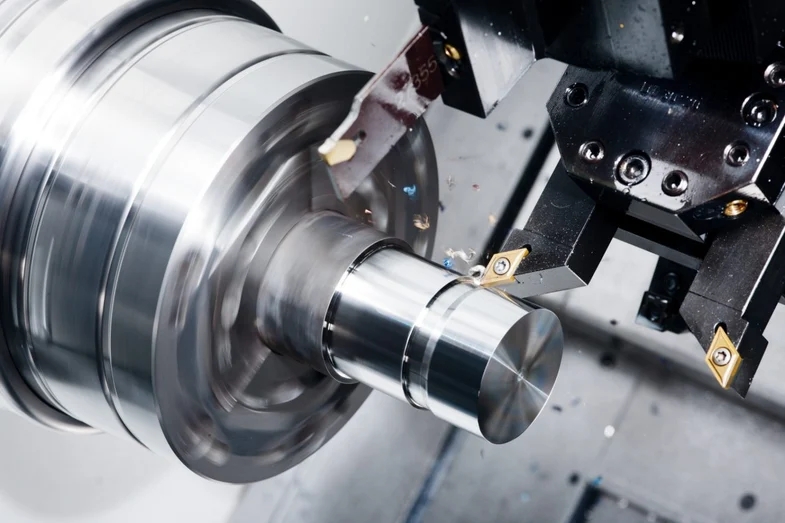
Modern CNC turning machines use G-code commands to perform operations such as facing (G94), turning (G90), threading (G76), or drilling (G83).
Transfer via USB or network and load it into the controller.
Machine simulation or graphic display helps detect possible collisions or overtravel issues before running.
Confirm tool numbers, feed rates, spindle speeds, and coordinate values. Check sequence order for logical consistency.
Define maximum travel limits for each axis to avoid mechanical interference.
Save backup copies of the program and record program version on the job sheet for repeatability.
Before producing actual parts, testing ensures safety and accuracy.
1. Run in dry mode (air cut).
With the coolant off and no material loaded, observe tool movement through the full program path. Listen for abnormal motor sounds or axis drift.
2. Check tool change positions.
Each time the turret indexes, confirm clearance between tools, chuck jaws, and the part.
3. Trial cut with scrap material.
Mount a test piece of the same material as the real part and execute the full cycle. Adjust offsets based on measured dimensions afterward.
4. Measure test part.
Verify diameters, lengths, taper angles, and thread pitches against drawings. Fine-tune tool offsets accordingly.
5. Run the production part when satisfied.
Once all adjustments are complete, start machining your actual production batch. Maintain monitoring throughout the cycle for consistency.
After your machine is set and running, continuous optimization is critical to achieve stable and cost-effective results.
Inspect inserts frequently. A worn tip causes chatter, burns, or poor surface finish. Replace before breakage to avoid damage to workpieces.
Adjust feed rate, depth of cut, and spindle speed according to material. For hard steels, slower feeds and higher coolant flow are often required.
Proper coolant direction ensures chip evacuation and reduces thermal expansion. Check coolant pressure and nozzle positioning regularly.
Reduce tool overhang, tighten slideways, use damped boring bars, and ensure solid workholding. Small changes can have a big impact on finish quality.
Re-level the machine periodically and inspect spindle runout using precision test bars. Preventive maintenance ensures long-term accuracy.
Some typical mistakes that lead to downtime or poor quality include:
- Neglecting to remeasure tools after replacement.
- Using incorrect coordinate system (G54 vs G55).
- Setting wrong spindle speed or feed for the selected material.
- Forgetting to lock tailstock or turret before starting rotation.
- Overlooking coolant temperature variation in high-precision jobs.
Keeping a step-by-step setup checklist helps avoid these costly oversights.
Precision-balanced holders reduce vibration and extend insert life.
Probe systems eliminate manual offset errors and speed up setup time.
Uneven tightening affects repeatability and cutting angle precision.
Both machine and workpiece can expand under heat; compensate offsets accordingly.
Automatic measurement systems can verify diameter during machining and correct deviations in real time.
These advanced methods transform a good setup into a world-class operation ready for high-volume and precision production.
Once the machine is configured and tested, routine maintenance ensures consistent accuracy over time.
- Clean the chuck, slides, and way covers daily.
- Drain and refill coolant periodically to prevent bacterial growth.
- Calibrate encoder and tool turret at least once per quarter.
- Lubricate ball screws and linear guides according to manufacturer schedules.
- Log all maintenance activities in an inspection sheet.
Taking care of the CNC lathe protects your investment and guarantees reliable future performance.
Setting up a CNC turning machine is both a technical science and an art. The process includes understanding the machine, preparing the environment, mounting the workpiece, calibrating tools, setting coordinates, verifying programs, and performing trial cuts. Each phase builds on the previous one to ensure accurate and safe machining.
With experience, setup becomes faster and more intuitive, but attention to detail should never be compromised. Consistent application of these steps results in smoother operations, improved quality control, and fewer interruptions—ultimately leading to better productivity and profitability in modern manufacturing.
CNC turning involves a rotating workpiece and stationary cutting tools, ideal for round components. CNC milling keeps the workpiece fixed while rotating tools cut in various directions for complex shapes.
It depends on cutting speed, material hardness, and coolant quality. Sharpen or replace inserts once surface finish deteriorates or tools show visible wear edges.
Yes, but proper training is mandatory. Start under supervision, learning basic commands, safety practices, and manual operations before handling automatic programs.
Most CNC lathes can work with aluminum, steel, stainless steel, brass, copper, titanium alloys, and engineering plastics. Selection of inserts depends on material hardness.
Maintain short tool overhang, use steady rests for long workpieces, adjust feed ratio, and verify tool sharpness. Keeping the cutting edge rigid and stable ensures a fine surface finish.


