From idea to market-ready product, our NPI solutions make every stage easier, faster. Discover How We Help

Views: 222 Author: Tomorrow Publish Time: 2026-01-18 Origin: Site
Content Menu
● Can Sculptris Output CNC-Ready Files?
● When Does Sculptris Mke Sense for CNC?
● Typical Workflow: From Sculptris to CNC
>> 1. Sculpting the Model in Sculptris
>> 2. Exporting and Converting the File
>> 3. Cleaning and Simplifying the Mesh
>> 4. Importing into CAM Software
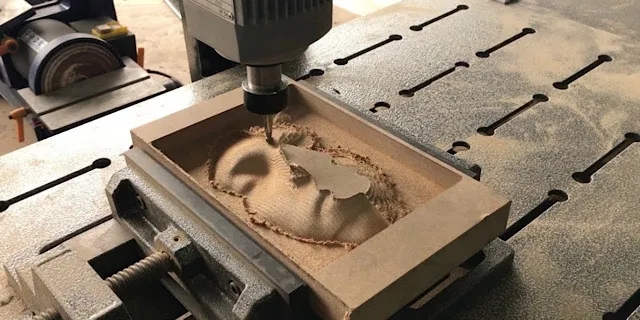
>> 5. CNC Machining the Sculpted Model
● Limitations of Using Sculptris for CNC
● Alternatives and Related Tools
● Best Practices When Using Sculptris for CNC
● Practical Use Cases: Sculptris and CNC
● Common Pitfalls and How to Avoid Them
● FAQ
>> 1. Is Sculptris directly compatible with CNC machines?
>> 2. What file format should I export from Sculptris for CNC work?
>> 3. Can Sculptris be used to design mechanical parts for CNC machining?
>> 4. How do I avoid mesh problems when moving from Sculptris to CAM?
>> 5. What types of CNC projects are best suited to Sculptris?
Sculptris can be used in a CNC workflow, but only indirectly and with important limitations, because it is focused on artistic digital sculpting rather than precise manufacturing. With the right conversion and CAM tools, however, Sculptris models can still be machined on a CNC router or mill for specific artistic and relief projects.

Sculptris is a free 3D modeling software originally created by Tomas Pettersson and later developed by Pixologic, the company behind ZBrush. It uses a digital clay paradigm, letting users push, pull, pinch and smooth a base shape to create mainly organic and character-style models.
Sculptris is designed for artistic creation and simple entry into digital sculpting rather than for engineering-grade solid modeling. It is especially effective for single, detailed models like characters or creatures, and is less suitable for architectural or highly geometric designs that demand precise dimensions.
Sculptris does not support direct STL export, which is the most common mesh format used by both 3D printing and CNC CAM software. Instead, Sculptris exports mesh files such as OBJ, which must then be converted to STL or another CNC-compatible format using tools like MeshMixer or other mesh utilities.
Because Sculptris is polygon-based and not a parametric CAD system, its models do not inherently carry precise dimensional constraints, tolerances, or solid-body data typical of engineering CAD. This means that while the geometry can be machined, additional cleanup, scaling, and verification steps are essential before generating toolpaths.
Sculptris can be very useful when the CNC project focuses on artistic reliefs, sculpted surfaces, or organic shapes, where visual appearance matters more than exact dimensions. Many makers use sculpting sotware to prepare decorative panels, bas-reliefs, and artistic carvings that are then milled from wood, foam, or soft metals.
For precise mechanical parts, brackets, housings, or assemblies that must fit together, dedicated CAD tools such as Fusion 360, SolidWorks, or similar packages with solid modeling and integrated CAM are more appropriate. Sculptris fits best as a front-end sculpting tool in a hybrid workflow, not as the primary design environment for engineered components.
A practical Sculptris-to-CNC workflow generally follows several stages, from sculpting to final machining.
In Sculptris, the designer begins with a simple sphere or basic shape and sculpts details using brushes like draw, crease, flatten, and smooth. The goal is to finalize the overall form and surface details suitable for carving, without worrying yet about CNC constraints.
During sculpting, keeping the model as clean and symmetrical as possible helps reduce problems in later stages. For reliefs intended for flat stock, the sculpt can be organized around a single dominant face that will become the machining side, with depth limited to what the chosen material and tooling can realistically handle.
Once the sculpt is ready, it is exported from Sculptris as an OBJ mesh file. Because Sculptris cannot natively export STL, the OBJ is loaded into a mesh-processing application such as MeshMixer, Blender, or similar software that supports OBJ-to-STL conversion.
In this conversion step, the user typically:
- Checks for non-manifold edges and obvious mesh errors.
- Applies decimation or remeshing if polygon counts are excessively high.
- Ensures correct scale and orientation before exporting the final STL or other CAM-compatible format.
Before CAM, the mesh often requires simplification and refinement to become CNC-friendly. High-density sculpting meshes can slow down and destabilize toolpath generation, so controlled decimation is applied to reduce polygon count while preserving essential detail.
Mesh utilities are commonly used to:
- Remove self-intersections and small stray components.
- Fill holes and unify shells into a watertight solid.
- Align the model with the CNC machine's coordinate system and establish a clear top surface for machining.
In some workflows, the sculpt is first merged into a single solid mesh using a “make solid” or similar operation, especially if the Sculptris model was built from multiple primitives. This step helps ensure that CAM software interprets the object as one coherent volume instead of disconnected fragments.
The cleaned STL is imported into CAM software that can generate toolpaths from mesh models, such as MeshCAM, Fusion 360's Manufacture workspace, or other 3D CAM solutions. The CAM tool treats the imported surface as a height field or 3D solid and allows the user to configure roughing and finishing strategies.
At this stage, the machinist selects tools, stepovers, stepdowns, and feeds suitable for the material and desired surface finish. Simulation runs are performed to detect collisions, gouging, or over-travel before any material is cut, which is particularly important for deep organic shapes that can easily trap toolpaths in concave regions.
After verifying CAM simulations, the toolpaths are post-processed into G-code for the specific CNC machine controller. The material blank is then fixtured, zeroed, and machined in stages, usually beginning with a bulk roughing pass followed by smaller-tool finishing passes to capture the sculpted detail.
For deep reliefs or double-sided sculptures, the machinist may use indexed setups or flip strategies, often relying on alignment pins or reference features for accurate registration. Final hand sanding or minor finishing is common, particularly for wood and soft materials, to refine the surface left by the cutter and blend any visible tool marks.
Despite being technically usable in a CNC pipeline, Sculptris has several structural limitations for machining work.
- Lack of dimension control: Sculptris does not provide parametric dimensions, constraints, or precision sketch tools, making it difficult to enforce exact sizes or tolerances.
- No native STL export: The need to convert OBJ to STL introduces extra steps and potential errors, especially if scale or orientation changes during conversion.
- Organic mesh topology: The automatically tessellated, sculpt-driven topology is not optimized for machining or CAD modification and may contain local irregularities that complicate toolpath creation.
- Single-part focus: Sculptris is oriented around individual sculptures, not multi-body assemblies that must mate or align in precise ways.
- Limited multi-object handling: Managing multiple separate components in a single file is cumbersome, which makes complex assemblies or fixtures difficult to author directly.
These characteristics mean Sculptris is best treated as a front-end sculpting tool whose outputs are polished and constrained by other software before CNC manufacturing.
Users who like the Sculptris style of digital clay often migrate toward ZBrush, which includes Sculptris Pro mode for adaptive tessellation. ZBrush is widely used to prepare high-detail models, which are then decimated and exported as STL for 3D printing or CNC relief work.
For more engineering-oriented CNC projects, CAD platforms such as Fusion 360, Rhino, SolidWorks, or similar systems offer precise modeling, direct STL or STEP export, and integrated CAM workflows. Some makers also combine sculpting and CAD, for example using ZBrush or Blender for artistic surfaces and Fusion 360 for base geometry, alignment features, and final toolpath generation.
Mesh-oriented tools like MeshMixer or other STL editors are often paired with Sculptris because they can:
- Repair and separate complex meshes.
- Provide plane cuts to create flat backs or split parts.
- Offer basic sculpting and smoothing for quick edits without returning to Sculptris.
When Sculptris is used in a CNC pipeline, several practices can improve reliability and quality.
- Plan for manufacturability from the beginning, keeping shapes within the reach of your cutter length and machine travel.
- Keep the model thickness and relief depth appropriate for the available tool lengths and material rigidity.
- Avoid extreme undercuts that a standard 3-axis machine cannot reach without specialized fixtures or 4-axis or 5-axis motion.
- Regularly check mesh integrity during sculpting and after conversion, fixing non-manifold edges and holes early before they propagate downstream.
- Use decimation to reduce polygon counts before CAM, balancing detail against computation time and toolpath complexity so the CAM software remains responsive.
- Verify scale after each format conversion to prevent accidental size changes between OBJ, STL, and CAM imports.
- Orient the model in CAM so that the most visible or critical surfaces get the best tool access and finishing quality.
For projects that mix CAD precision and sculpted surfaces, a common strategy is to:
- Model the base block, alignment features, and functional interfaces in CAD.
- Export a simplified base into the sculpting software for artistic detailing.
- Re-import the detailed surface into CAD or directly into CAM, where mechanical references are preserved.
Several real-world use cases highlight where Sculptris can add value in CNC workflows.
- Decorative wall panels: Artisans can sculpt a bas-relief in Sculptris and mill it into wood or MDF panels for interior decoration or signage.
- Custom plaques and awards: Unique textures, logos, or character busts can be sculpted and then CNC-machined into hardwoods or plastics.
- Themed furniture elements: Organic motifs such as leaves, animals, or ornamental scrollwork can be sculpted and carved into chair backs, bed headboards, or cabinetry.
- Props and cosplay: Costumers can sculpt stylized armor, emblems, or creature details, then machine them in foam or resin board for lightweight but accurate parts.
These applications focus more on visual impact than on tight mechanical tolerances, which plays to Sculptris's strengths as an artistic tool.
Beginners moving from Sculptris to CNC often face some recurring problems.
- Excessive polygon counts: Overly dense meshes make CAM slow or unstable. Use decimation or remeshing tools to bring the polygon count down before toolpath generation.
- Distorted straight edges: Because Sculptris is optimized for organic forms, straight edges and plane surfaces often become slightly warped, which may be unacceptable for mechanical fits or crisp patterns. Consider modeling strict geometry in CAD instead.
- Broken or open meshes: Holes, self-intersections, and non-manifold regions can cause CAM to misinterpret the geometry. Always run mesh repair tools before export to CAM.
- Orientation mistakes: If the relief is not aligned with the machine axes, toolpaths may cut too deep or leave unexpected steps. Double-check orientation and zero points in both mesh software and CAM.
By anticipating these pitfalls and building mesh checks into the workflow, Sculptris users can achieve more predictable CNC outcomes.
Sculptris can be part of a CNC machining workflow, but only as an artistic sculpting front end, not as a complete CAD/CAM solution. Because it lacks native STL export, precise dimensioning, and manufacturing-oriented tools, its models must be converted, cleaned, and processed in other applications before toolpaths are generated.
For organic reliefs, decorative carvings, and sculptural pieces, Sculptris can still provide visually rich geometry that CNC machines can carve once properly prepared. For functional mechanical components and tightly toleranced parts, however, professional CAD and CAM software remain the more appropriate choice, with Sculptris serving only as an optional source of artistic detail.
Contact us to get more information!

No, Sculptris is not directly compatible with CNC machines because it cannot export standard CNC formats like STL or generate toolpaths or G-code. To use Sculptris models on a CNC machine, the mesh must be exported as OBJ, converted to STL or another supported format in external software, and then processed in CAM software to create machining toolpaths.
The recommended export from Sculptris is an OBJ file, which preserves the sculpted mesh geometry. That OBJ file can then be opened in tools such as MeshMixer, Blender, or other mesh utilities and converted to STL, which most CAM and CNC workflows accept for toolpath generation.
Sculptris is not suitable for designing mechanical parts that require exact dimensions, fits, and tolerances, because it is a freeform sculpting tool without parametric constraints. For mechanical parts, CAD systems like Fusion 360, SolidWorks, or similar software with solid modeling and integrated CAM provide the accuracy and control needed for CNC manufacturing.
To avoid mesh problems, use mesh-processing tools to check and repair non-manifold edges, fill holes, and remove self-intersections after exporting from Sculptris. Applying controlled decimation to lower polygon counts and carefully validating the model's scale and orientation before importing into CAM also reduces toolpath errors and performance issues.
Sculptris is best suited to artistic CNC projects such as bas-reliefs, sculpted plaques, decorative panels, and organic forms where visual style is more important than strict dimensional accuracy. In these cases, Sculptris can provide rich surface detail that, once converted and prepared, can be machined effectively using appropriate CAM software and CNC tooling.
1. https://www.sculpteo.com/en/glossary/sculptris-definition/
2. https://www.sculpteo.com/en/tutorial/sculptris-tutorial/
3. https://www.sculpteo.com/blog/2018/07/16/3-easy-steps-for-best-stl-files-resolution/
4. https://www.stratasys.com/en/stratasysdirect/resources/articles/how-to-prepare-stl-files/
5. https://support.zortrax.com/exporting-stl-files-from-3d-modeling-software/
6. https://3dprintboard.com/showthread.php?5344-Software-for-both-3D-printing-and-CNC-machine
7. https://www.norwegiancreations.com/2017/08/sculptris-first-impressions-and-3d-printing
8. https://help.maxon.net/zbr/en-us/Content/html/user-guide/3d-modeling/modeling-basics/creating-meshes/sculptris-pro/sculptris-pro
9. https://www.studica.com/blog/get-your-free-sculptris-3d-sculpting-software-its-easy/
10. https://www.makera.com/blogs/article/3d-scanning-discover-a-different-method-to-streamline-your-cnc-workflow


