From idea to market-ready product, our NPI solutions make every stage easier, faster. Discover How We Help

Views: 222 Author: Tomorrow Publish Time: 2025-12-22 Origin: Site


Content Menu
● Types of Tool Offsets in CNC Milling
>> Tool Radius or Diameter Offset (TRO)
● How to Set Tool Offsets on a CNC Machine
>> 1. Manual Tool Offset Setting
● Tool Offsets and CNC Programming
>> Tool Length Compensation (G43, G44, G49)
>> Cutter Radius Compensation (G41, G42, G40)
● Common Errors When Using Tool Offsets
● Benefits of Proper Tool Offset Management
● Advanced Tool Offset Strategies
>> Centralized Offset Databases
>> Integration with CAM Software
● Best Practices for Managing Tool Offsets
● FAQ
>> 1. What is the main purpose of tool offset in CNC milling?
>> 2. How is tool length offset measured?
>> 3. What's the difference between G43 and G44?
>> 4. Why is cutter radius compensation necessary?
>> 5. Can incorrect offsets damage the CNC machine?
Tool offset is a fundamental concept in CNC (Computer Numerical Control) milling that defines how the machine understands the position and geometry of each cutting tool in relation to the workpiece. Precision machining depends heavily on this concept, as tool offsets ensure the cutting path aligns perfectly with the programmed coordinates.
Without proper offsets, the CNC machine cannot distinguish between tools of different sizes, lengths, or wear conditions. The result could be incorrect tool paths, defects in part dimensions, or even damage to the machine and tool. Therefore, understanding how tool offset works—and how to set it correctly—is essential for achieving consistent, accurate results in CNC milling operations.
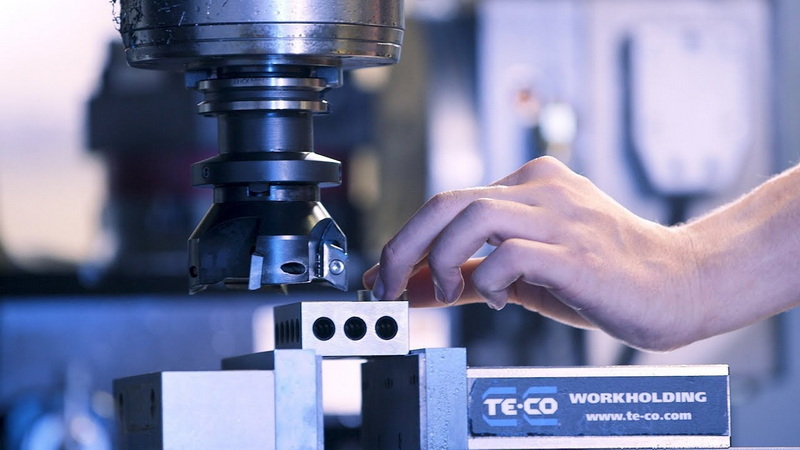
At its core, a tool offset represents a digital adjustment made by the CNC control system to account for variations in tool geometry. Every cutting tool differs slightly in exact dimensions and wear over time. The offset value tells the machine how far the actual cutting edge is from a reference point, such as the machine's spindle nose or work coordinate system.
When the CNC operator sets a tool offset, they are essentially "teaching" the machine where the tool tip or side is located. Once this data is entered, the control unit uses it automatically during operation to compensate for tool size and position—resulting in precise machining without requiring manual measurement for every cut.
Accurate offsets ensure that when a program calls for a cut at a specified position, the actual tool cuts exactly to that depth and location. The concept may seem simple, but in high-precision manufacturing, even an error as small as 0.01 mm can cause a part to fail quality inspection.
Imagine machining an engine component that requires multiple tools: a drill, an end mill, and a chamfer tool. Each of these tools has different diameters and lengths. By applying individual offsets, the CNC machine can use a unified coordinate system while still compensating for the differences between tools, allowing seamless operations without manual recalibration between tool changes.
CNC milling typically uses two primary offset types: tool length offsets and tool radius or diameter offsets. Some advanced machines also incorporate wear offsets, fixture offsets, and custom offsets depending on the control system capabilities.
The tool length offset defines the distance between the spindle reference point (usually the face of the spindle) and the tool's cutting tip. Every tool has a slightly different length, and this difference must be recorded to achieve precise Z-axis positioning.
When an operator changes a tool, the machine's Z-axis home position remains unchanged. However, the new tool will extend a different distance from the spindle. Without updating the tool length offset, the machine may cut too deeply or too shallowly, leading to flawed parts.
Tool length offsets are usually stored as numerical values in the machine's tool table. For instance, Tool 1 may have a length offset of 120.654 mm, while Tool 2 might be 118.987 mm. These values are applied automatically whenever the corresponding tool is active.
Setting accurate length offsets is critical during initial setup. Operators can determine this offset using manual touch-off procedures, automatic probing systems, or external tool presetters.
The tool radius (or diameter) offset compensates for the cutting tool's width when performing contour milling, profiling, or pocketing. Since the CNC program's path describes the motion of the tool's center, not the cutting edge, the system must offset this center by the tool's radius to achieve the correct geometry.
If a program specifies a contour, the machine must move slightly to one side of the programmed line depending on the direction of compensation. The CNC control uses G-code commands like G41 (left compensation) and G42 (right compensation) to determine this.
Using the correct TRO value ensures precision during inside or outside contouring—particularly for parts with intricate shapes or tight tolerances. Incorrect radius offsets often result in undersized or oversized features, which can be costly in production environments.
Setting tool offsets correctly is a key step in every CNC setup process. While techniques vary based on the control system and machine type, the underlying principles remain similar.
Manual offset setting involves touching off the tool against a reference surface—often the top of the workpiece or a tool setter block. The operator slowly moves the tool in the Z-axis until it lightly contacts the reference point, then records the coordinate value.
This value is entered into the machine's tool offset table for that specific tool number. Though this method requires skill and caution, it remains common in small workshops and educational environments where automation may not be available.
Modern CNC machines are often equipped with automatic tool measurement systems, such as touch probes or in-spindle sensors. These systems accurately detect the tool tip's position and automatically store its length offset value.
Automatic measurement eliminates human error and saves time—especially useful when setting up multiple tools in a tool magazine or turret. Many high-end machines also allow dynamic offset updates during production to compensate for gradual tool wear.
A tool presetter is an external, offline device used to measure tools outside of the CNC machine. It determines the precise tool geometry—including length and diameter—before installation.
Operators can then input these measured values directly into the CNC control system, reducing downtime. Using off-machine presetters also helps maintain consistent tool data across different machines, which is essential in large-scale production.
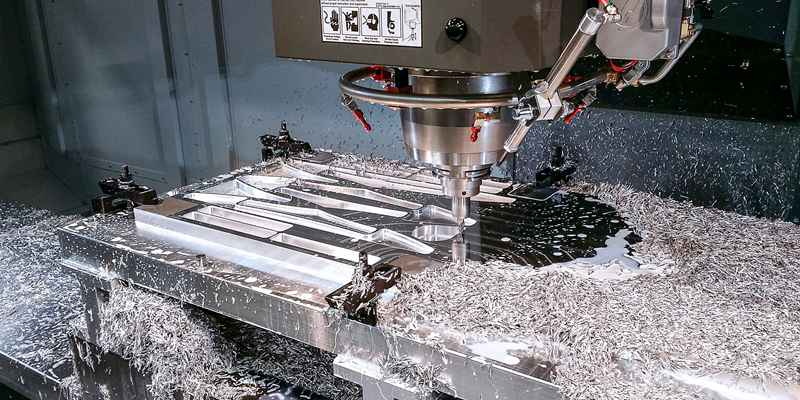
Offsets play a vital role in G-code programming by allowing flexibility and precision. The CNC program itself often does not contain exact tool geometry data; instead, it references offsets stored in the machine's memory.
- G43 applies a positive tool length offset.
- G44 applies a negative offset.
- G49 cancels tool length compensation.
For example, a G-code line might read:
`G43 H02 Z100.0`
This command activates the length offset for tool number 2 using register H02 and positions the Z-axis to 100 mm.
- G41 activates left-side compensation.
- G42 activates right-side compensation.
- G40 cancels cutter compensation.
Proper use of G41 and G42 ensures that the machine accounts for the tool's radius when following part contours. Skilled machinists understand when to use left or right compensation depending on the toolpath direction.
Beginners often encounter mistakes when setting up or programming tool offsets. Common issues include:
- Incorrect reference point selection: Touching off from an unintended surface causes errors in zero positions.
- Failing to record separate offsets per tool: Assuming all tools share the same offset leads to inconsistent depths and features.
- Confusing tool numbers with offset register numbers: A mismatch between them can yield unpredictable results.
- Neglecting to account for tool wear: Continuous use shortens tool length and alters effective geometry, requiring offset updates.
- Wrong sign input (+/–): Reversing a direction may cause the tool to plunge into the part or table, leading to crashes.
Maintaining accurate records and following standardized setup procedures help prevent these costly problems.
Effective offset management enhances productivity, part quality, and machine safety.
- Precision machining: Proper offsets guarantee repeatable accuracy and minimal deviation across batches.
- Reduced setup time: Pre-calibrated offsets enable faster tool changes between operations.
- Improved surface finish: Constant cutting depths produce smoother, more consistent surfaces.
- Increased tool life: Correct offsets prevent overcutting, tool rubbing, or excessive heat buildup.
- Streamlined multi-tool operations: Automated systems minimize operator intervention and errors.
In short, attention to tool offsets leads directly to better efficiency and profitability.
As CNC technology evolves, shops increasingly employ advanced strategies for managing offsets.
Some machines track tool wear in real time using sensors or machine learning algorithms. They automatically adjust wear offsets (also called wear compensation) to maintain constant dimensions during production runs.
Manufacturers with multiple machines often maintain centralized databases for tool information. These systems store tool dimensions, life statistics, and offsets, allowing any machine to import the right parameters quickly.
Modern CAM (Computer-Aided Manufacturing) programs can export tool offset data directly to the CNC control, minimizing the need for manual entry. This integration ensures complete consistency between digital design and actual machining.
To achieve optimal performance, follow these practical guidelines:
1. Label tools clearly with unique numbers and keep consistent records in both digital and physical logs.
2. Verify tool offsets routinely using master gauges or calibration blocks.
3. Separate wear offsets from geometry offsets to simplify incremental corrections.
4. Use tool presetters whenever possible to reduce machine downtime.
5. Perform trial runs when introducing new tools or complex programs.
6. Train all operators in proper offset and compensation procedures.
7. Back up offset data regularly to prevent loss due to control resets or crashes.
Adopting these practices will make setups more efficient, reduce scrap, and maintain long-term accuracy.
Tool offset in CNC milling bridges the gap between programmed coordinates and the machine's physical reality. It compensates for differences in tool size, length, and wear—ensuring accurate, repeatable cuts every time.
Whether managed manually or automatically, proper understanding and maintenance of tool offsets determine the quality, productivity, and safety of CNC operations. As technology continues to advance, precision offset management remains the cornerstone of high-quality machining.
The main purpose of tool offset is to align the tool's actual position with the programmed coordinates by compensating for differences in tool geometry and wear. This ensures precise cutting depth and accuracy.
Tool length offset is measured using touch-off methods, automatic tool setting probes, or external tool presetters. The distance from the spindle face to the tool tip is recorded to determine the offset.
G43 adds tool length offset in the positive direction (most commonly used), while G44 adds compensation in the negative direction. G49 cancels the active compensation.
Cutter radius compensation allows the CNC to offset the tool center by its radius during contouring. This ensures the final part matches the programmed geometry precisely, even when tool diameters vary.
Yes. If offsets are input incorrectly, the tool can collide with the workpiece, fixture, or machine table, causing severe damage to both the machine and tooling. Always verify offsets before running a program.


