From idea to market-ready product, our NPI solutions make every stage easier, faster. Discover How We Help

Views: 222 Author: Tomorrow Publish Time: 2025-12-18 Origin: Site


Content Menu
● Understanding CNC Turning Fundamentals
● Essential Components of a CNC Turning Program
● Preparation Steps Before Programming
>> 1. Analyze the technical drawing:
>> 2. Choose the right cutting tools:
>> 3. Plan machining operations logically:
>> 4. Establish the coordinate system:
>> 5. Determine cutting parameters:
● Structure of a CNC Turning Program
>> Tool Selection and Spindle Start
>> Finishing and Safety Commands
● G-Codes and M-Codes Reference
● Advanced Programming Features
>> Subroutines
>> Tool Nose Radius Compensation
>> Constant Surface Speed (CSS)
● Best Practices for Writing CNC Turning Programs
● Common Mistakes and How to Avoid Them
● Practical Example: Full Program Outline
● FAQ
>> (1) What software can I use to write CNC turning programs?
>> (2) What's the difference between G96 and G97 modes?
>> (3) How do tool offsets work in CNC turning?
>> (4) Can the same program run on different CNC machines?
>> (5) How can I validate or check my CNC program?
CNC turning is one of the most versatile and widely used processes in manufacturing. Writing efficient CNC turning programs allows machinists to produce high-quality parts with precision, repeatability, and speed. Whether you are new to CNC machining or an experienced programmer looking to refine your skills, understanding how to write CNC turning programs is essential for creating consistent, accurate, and safe machining operations.
This comprehensive guide covers the principles of CNC turning, program structure, common G- and M-codes, setup considerations, best practices, and examples to help you develop professional-grade CNC turning programs.

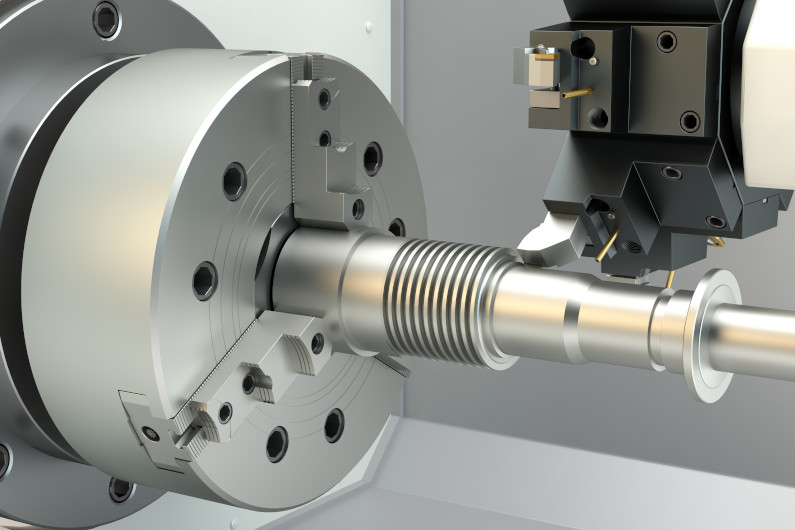
CNC turning is a subtractive manufacturing technique where a single-point cutting tool removes material from a rotating workpiece. It's primarily used to produce symmetrical parts, such as shafts, bushings, or rings. The machine that performs this operation—known as a CNC lathe or CNC turning center—follows coded instructions to execute tool movements automatically.
The motions in a CNC turning process are controlled along two main axes:
- X-axis: Controls the cutting tool's radial movement, determining the diameter.
- Z-axis: Controls the tool's longitudinal movement along the spindle axis.
A third axis (C-axis) may be available in advanced machines for milling or drilling operations on the same setup. Understanding how these axes work is crucial before starting to write a CNC program because every tool movement depends on these coordinates.
A CNC turning program is a structured set of coded instructions that tells the machine what to do. These codes correspond to specific functions such as moving tools, setting feed rates, controlling spindles, or turning coolant systems on or off. The key components are:
- G-codes (Preparatory functions): Define cutting motions like rapid movement (G00), linear cutting (G01), threading (G76), or canned cycles (G71–G73).
- M-codes (Miscellaneous functions): Control machine-specific actions like starting or stopping the spindle, coolant, or tool changes.
- Coordinate commands: Specify the tool's position on X and Z axes.
- Feed rate (F): Defines how fast the tool advances per revolution or per minute.
- Spindle speed (S): Specifies how fast the workpiece rotates.
- Tool call (T): Identifies which tool and associated offset to use.
Every CNC turning program is essentially a sequence of commands executed line by line, transforming a block of raw material into a finished component.
Writing an accurate CNC turning program starts long before any code is typed. Proper planning is critical. Here are the preparatory steps:
Review all part dimensions, tolerances, and surface finish requirements. Understanding what is required helps in selecting suitable operations.
Select appropriate inserts, tool holders, and geometries for the workpiece material. The choice of tool affects cutting efficiency, surface finish, and tool life.
Sequence the operations in a way that minimizes tool changes and part handling. Most parts are machined in stages: facing, rough turning, finish turning, grooving, threading, drilling, and parting off.
Define the workpiece zero point or reference point accurately, often on the face and outer diameter of the stock.
Select spindle speed, feed rate, and depth of cut based on material type and tool manufacturer recommendations.
Proper preparation reduces the chance of tool crashes, coordinate errors, and wasted material.
Although CNC turning programs can vary depending on machine type and controller brand (e.g., Fanuc, Haas, Siemens), most follow a similar structure. Below is the general format:
A header includes the program number and initial setup commands.
O1000 (SHAFT PROGRAM)
G21 G40 G80 G90
- O1000: Program number (unique identification).
- G21: Set units to metric.
- G40: Cancel tool radius compensation.
- G80: Cancel any fixed cycles.
- G90: Set absolute coordinate mode.
T0101
G96 S200 M03
- T0101: Selects tool 1 with offset 1.
- G96: Constant surface speed mode.
- S200: Cutting speed = 200 m/min.
- M03: Starts spindle clockwise.
G00 X100 Z5
G01 Z0 F0.2
G01 X0 F0.1
Facing is the first operation on raw stock to prepare a clean surface for measurement and further machining.
G00 X2.0 Z0.1
G01 Z-60 F0.25
G01 X4.0
Here, the tool removes material along the Z-axis to achieve a specific length and then increases the diameter as required.
Grooving operations use specific cycle codes (like G75) and threading uses cycles such as G76:
G76 P020060 Q100 R0.05
G76 X1.5 Z-20 P500 Q200 F1.5
This cycle defines depth, threads per inch, and pitch fed automatically.
After all operations are done, the program must return tools to safe positions and turn off spindle and coolant.
G00 X100 Z100
M09
M05
M30
- M09: Turns off coolant.
- M05: Stops spindle.
- M30: Ends program and resets control.
| Code | Function | Description |
|---|---|---|
| G00 | Rapid positioning | Moves tool quickly without cutting |
| G01 | Linear interpolation | Moves tool in a straight line at feed rate |
| G02 / G03 | Circular interpolation CW/CCW | For arcs and radii |
| G20 / G21 | Inch / Metric | Selects unit system |
| G40 / G41 / G42 | Tool nose compensation | Controls tool radius compensation |
| G50 | Spindle speed limit | Restricts maximum RPM |
| G70 | Finishing cycle | Finishes profile to programmed geometry |
| G71 | Rough turning cycle | Automatically rough cuts profile |
| G76 | Threading cycle | Simplifies multiple passes for threads |
| G96 / G97 | Constant surface / Spindle RPM | Controls spindle speed mode |
| M-code | Function | Description |
|---|---|---|
| M03 | Spindle ON (CW) | Rotates spindle clockwise |
| M04 | Spindle ON (CCW) | Rotates spindle counterclockwise |
| M05 | Spindle OFF | Stops rotation |
| M06 | Tool change | Commands tool change |
| M08 | Coolant ON | Starts coolant flow |
| M09 | Coolant OFF | Stops coolant |
| M30 | End of program | Rewinds and ends |
These commands combine to make the CNC turning process possible, instructing every mechanical action precisely.
Experienced programmers often incorporate advanced features for efficiency and precision.
Subroutines (often denoted by M98/M99) are reusable sections of code that execute frequently repeated machining patterns. Using subroutines minimizes program length and reduces mistakes.
Canned cycles like G71 (rough turning) or G70 (finish turning) automate multi-pass operations, saving time and keeping code concise. They automatically control depth, retract distances, and feed rates across multiple toolpaths.
When programming finishing operations, applying tool nose radius compensation (G41 or G42) ensures that the programmed part dimension matches the real cutting geometry by accounting for the tool's radius.
CSS mode (G96) ensures that as the tool moves closer to the workpiece center, the spindle speed increases proportionally to maintain uniform cutting speed, improving surface finish and prolonging tool life.
To write precise, safe, and efficient CNC programs, consider the following practices:
1. Start with a clear plan: Outline every machining step before coding.
2. Keep codes consistent and organized: Maintain structure and avoid confusing modal commands.
3. Double-check coordinates and units: Unit mismatches (inches/mm) can cause serious errors.
4. Add comments: Use parentheses to annotate what each line does, improving readability.
5. Simulate before cutting: Always run simulations in CAM software or dry-run mode.
6. Optimize feed and speed: Adjust cutting parameters based on actual results.
7. Use safety lines: Prevent the machine from starting operations under unexpected modes.
8. Maintain tool offsets regularly: Calibration ensures long-term accuracy.
Following these guidelines enhances reliability, reduces setup time, and ensures smooth production cycles.
Even skilled programmers encounter issues that can lead to defects or machine crashes. Here are some typical errors and ways to correct them:
- Incorrect zero point setup: Always confirm reference point alignment before operations.
- Tool offset confusion: Keep offsets consistent between setup sheets and program definitions.
- Ignoring feed direction: Wrong feed direction can damage tools or the workpiece.
- Not canceling modal codes: Always reset modes (like G41, G42, or G96) at the end.
- Improper retract position: Without safe retracts, tools risk colliding during indexing.
Vigilance and proper testing are key to professional-level CNC programming.
Here's a simplified example illustrating a complete CNC turning cycle for a small shaft:
O0001 (SIMPLE SHAFT)
G21 G40 G80 G90
T0101
G96 S180 M03
G00 X50 Z5
G01 Z0 F0.2
G01 X0
G00 X50 Z5
G71 U2 R1
G71 P10 Q20 U0.5 W0.2 F0.3
N10 G00 X30
G01 Z-40
N20 G00 X50
G70 P10 Q20
M09
M05
G00 X100 Z100
M30
This code performs facing, rough turning, and finishing operations in one continuous process.
CNC turning programming combines technical logic with creative problem-solving. Understanding how to properly structure programs, use G- and M-codes, and plan efficient workflows is vital for precision manufacturing. With proper planning, clear logic, and simulation testing, programmers can achieve optimal surface finishes, tight tolerances, and minimal wasted time or material. Mastery of CNC turning programming opens the door to higher productivity, advanced machining operations, and competitive manufacturing results.
You can use simple text editors like Notepad or integrated CAD/CAM software like Fusion 360, Mastercam, or GibbsCAM. These tools allow both manual coding and automated G-code generation.
G96 (CSS mode) maintains a constant cutting speed by adjusting spindle RPMs automatically. G97 (fixed RPM) keeps the spindle at a set speed. G96 improves surface finish consistency.
Offsets define the distance between the theoretical tool point and the actual cutting edge. Setting them correctly ensures accurate dimensions and consistent part sizes.
Yes, but adjustments are usually necessary. Controller models (e.g., Fanuc, Haas, Siemens) interpret some codes differently. Always verify compatibility before running.
You can validate programs using simulation software or by performing a dry run without material. Both methods help confirm motion paths, clearance, and coordinates before live cutting.


