From idea to market-ready product, our NPI solutions make every stage easier, faster. Discover How We Help

Views: 222 Author: Tomorrow Publish Time: 2025-11-30 Origin: Site


Content Menu
● Understanding CNC Turning Operations
● Key Components of CNC Programs for Turning
● Steps to Write a CNC Program for Turning
>> 1. Review the Part Drawing and Specifications
>> 2. Select Tools and Set Offsets
>> 3. Establish Machine Zero Points
>> 4. Write the G-Code Program
>> 5. Utilize Canned Cycles and Subprograms
>> 6. Simulate and Test the Program
● Common G-Codes and M-Codes in Turning
● Tips for Efficient CNC Turning Programming
● Advanced CNC Turning Programming Techniques
● Selecting the Right Software Tools
● FAQ
>> 1. What is the first step in writing a CNC program for turning?
>> 2. Which programming language is used for CNC turning?
>> 3. How are tool changes managed in CNC turning programs?
>> 4. What are canned cycles and how are they used in turning programs?
>> 5. How can simulation improve CNC turning programming?
CNC turning is a machining process where a workpiece rotates while a cutting tool removes material to form cylindrical or complex shapes. This method is essential in manufacturing to produce precise parts efficiently. CNC programs automate lathe operations, enabling consistent, accurate, and repeatable results across production runs.

Turning consists of several fundamental operations such as facing, rough turning, finishing, grooving, threading, and drilling. The workpiece is secured in a chuck and rotated, while the cutting tool moves along the X (radial) and Z (axial) axes. A solid understanding of these operations is crucial for writing CNC programs that optimize tool paths and reduce machining time while ensuring part quality.
CNC turning programs are primarily written in G-code, a numerical control language that commands machine actions. Essential components include:
- Defining coordinate zero points (usually at the workpiece face or centerline)
- Tool selection and setting tool length and diameter offsets
- Spindle speed and rotation direction control
- Feed rate settings appropriate to the material and tool
- Programming tool paths for roughing and finishing cuts
- Coolant on/off commands and safety controls
Identify critical dimensions, tolerances, surface finishes, and special features such as threads or grooves.
Choose cutting tools suitable for the operation and material. Input appropriate offsets for length and diameter to ensure correct cutting positions.
Define the zero coordinates on the machine, commonly at the face or centerline of the workpiece, to ensure accurate machining.
Craft the program to include spindle start (M03), spindle speed (S), feed rate (F), cutting moves (G01), rapid moves (G00), and tool changes (M06).
Use pre-programmed cycles like G71 (rough turning), G70 (finishing), or subprograms for repetitive operations to save time and simplify the code.
Use machine dry-run or CAM software simulation before actual machining to catch errors and optimize the tool path.
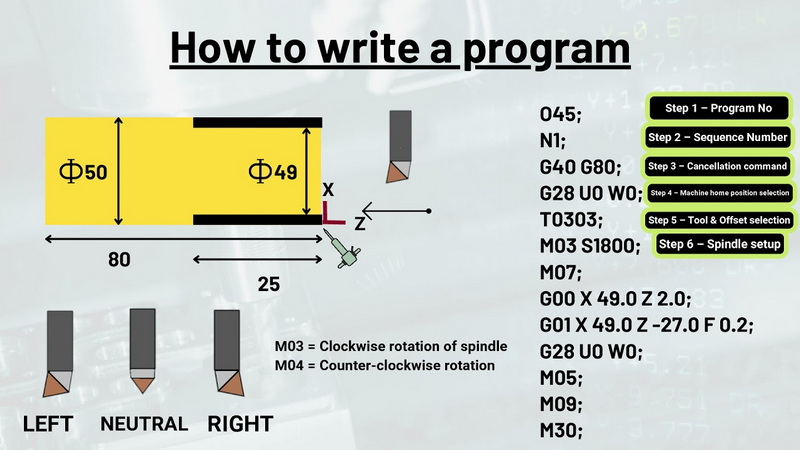
- G00: Rapid positioning
- G01: Linear interpolation (cutting feed)
- G02/G03: Circular interpolation, clockwise/counterclockwise arcs
- G18: Plane selection (XZ plane for turning)
- G90/G91: Absolute vs incremental programming
- M03/M04: Spindle start clockwise/counterclockwise
- M05: Spindle stop
- M06: Tool change
- M08/M09: Coolant on/off
- Always include safety commands such as G40 (cutter compensation cancel) and unit specification commands (G20 for inches, G21 for millimeters).
- Optimize tool paths by minimizing non-cutting movements to save cycle time.
- Adjust feed rates based on materials; slower feeds for rough cuts, faster for finishing.
- Use comments extensively to annotate program sections for clarity and ease of future edits.
- Employ canned cycles and subprograms to simplify complex repetitive tasks and production on multiple parts.
Mastering advanced methods improves machining quality and efficiency:
- Optimizing Tool Paths: Use CAM software to generate and visualize efficient toolpaths, reducing unnecessary tool movements and enhancing accuracy.
- Feed Rate Adjustment: Dynamically adjust feed rates during roughing and finishing to balance tool wear and surface finish. For example, slower feeds for hard materials and faster feeds for softer materials.
- Subprograms: Reuse code blocks with subprograms for batch production, significantly reducing programming time and error rate.
- Parametric Programming: Use variables within your code for adaptable parts, enabling quick adjustments in dimension or features without rewriting the entire program.
- Tool Compensation: Apply radius and length compensation commands (G41/G42) to counteract tool wear and improve dimensional accuracy.
- CAD/CAM Integration: Advanced CAM software automates toolpath generation directly from CAD models, supporting multi-axis turning and complex geometries.
- Simulation and Error Checking: Always simulate the program to detect collisions, toolpath errors, and optimize the machining process before actual production.
Combining CAD (Computer-Aided Design) and CAM (Computer-Aided Manufacturing) software is standard for modern CNC turning programming. Programs like Fusion 360 or Siemens NX CAM offer integrated design and automated toolpath generation, streamlining the programming workflow while minimizing errors.
Writing an effective CNC program for turning requires a solid understanding of turning operations, G-code syntax, tool selection, and machine setup. Leveraging canned cycles, subprograms, and CAM software tools can greatly improve efficiency and accuracy. Simulating and testing the program is essential to reduce errors and optimize machining processes, leading to high-quality parts and cost-effective production.

The first step is to thoroughly analyze the part drawing and understand the machining requirements, followed by selecting suitable tools and setting zero points on the machine.
G-code is the standard language for CNC turning, controlling machine movements, feed rates, spindle speeds, and tool changes.
Tool changes are executed using the M06 command, which instructs the machine to switch to a different cutting tool as programmed.
Canned cycles are predefined sequences for common operations such as rough turning (G71) and finishing (G70), simplifying programming and enhancing consistency.
Simulation helps detect programming errors, collisions, and inefficient toolpaths before actual machining, reducing scrap and machine downtime.
[1](https://www.supercncmachine.com/top-10-cnc-lathe-machine-programming-techniques/)
[2](https://blogs.sw.siemens.com/nx-manufacturing/top-5-advanced-cam-software-capabilities/)
[3](https://rosnokmachine.com/cnc-machine-programming/)
[4](https://tmc-technologies.com/cnc-programming/)
[5](https://www.youtube.com/watch?v=Qqg-aoVIs_8)
[6](https://jiga.io/articles/cnc-milling-cnc-turning/)
[7](https://www.youtube.com/watch?v=4xNMYLPE_jM)
[8](https://www.cnccookbook.com/cnc-programming-g-code/)
[9](https://gcodetutor.com/cnc-macro-programming.html)
[10](https://gcodetutor.com/cnc-machine-training/cnc-lathe-programming.html)


