From idea to market-ready product, our NPI solutions make every stage easier, faster. Discover How We Help

Views: 222 Author: Tomorrow Publish Time: 2026-02-03 Origin: Site


Content Menu
● Understanding Horizontal CNC Milling Machines
● Safety Precautions Before CNC Milling Setup
● Preparing the Installation Site
● Unpacking and Initial Assembly
● Leveling and Aligning the Machine
● Electrical and Control Connections
● Lubrication and Coolant Systems
● Installing and Configuring CNC Milling Tools
● Setting Tool Length and Diameter Offsets
● Workholding and Pallet Setup
● Establishing Work Coordinate Systems
● Powering On, Homing, and Axis Checks
● Programming and Loading G-Code
● Selecting CNC Milling Cutting Parameters
● Coolant Management in Horizontal CNC Milling
● Routine Inspection and Calibration
● Preventive Maintenance for Long-Term Performance
● FAQ
>> 1. What is the first step in setting up a horizontal CNC milling machine?
>> 2. How do you level a horizontal CNC milling machine accurately?
>> 3. Why are tool length offsets important in CNC milling setup?
>> 4. What workholding options are best for horizontal CNC milling?
>> 5. How do you test whether a horizontal CNC milling setup is correct?
Setting up a horizontal CNC milling machine is a critical process that determines the accuracy, safety, and productivity of your CNC milling operations. A structured, step-by-step approach helps you unlock the full potential of horizontal CNC milling for precision manufacturing.
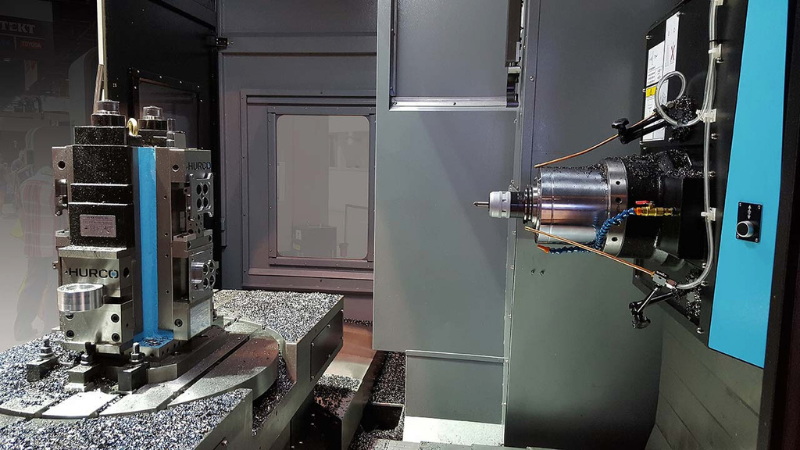
Horizontal CNC milling machines use a horizontally oriented spindle, which provides excellent rigidity and chip evacuation for demanding CNC milling jobs. This layout is especially effective when machining large parts, deep pockets, and multiple faces in a single setup.
Key components include the base, column, spindle, arbor or spindle nose, tool magazine, pallet changer, and CNC controller. Each element plays a direct role in CNC milling performance, influencing stability, accuracy, and repeatability.
Because the cutting forces in CNC milling are often substantial, the machine structure must be rigid, properly aligned, and supported by a stable foundation. Understanding how each axis and component interacts is the starting point for a correct setup.
Before you begin any work on the machine, safety must come first. Operators should wear suitable personal protective equipment such as safety glasses, hearing protection, gloves when appropriate, and steel-toed footwear.
Ensure all protective guards and doors are installed and functional, and verify that emergency stop buttons, interlocks, and alarms operate correctly. Never bypass safety systems on a CNC milling machine, even temporarily.
Lockout/tagout procedures should be applied before maintenance, wiring checks, or mechanical adjustments. This prevents accidental startup during the setup of your horizontal CNC milling machine and protects everyone on the shop floor.
A proper site is essential for accurate CNC milling. The horizontal CNC milling machine should sit on a rigid, vibration-free concrete foundation capable of supporting its full weight plus dynamic loads.
Maintain a stable, controlled environment, ideally with consistent temperature and humidity, to reduce thermal expansion and contraction. Place the CNC milling machine away from heat sources, direct sunlight, and excessive dust or coolant mist.
Provide adequate space around the machine for operator access, pallet loading, chip removal, and maintenance. Proper lighting and safe access paths improve both productivity and safety in everyday CNC milling operations.
When the horizontal CNC milling machine arrives, carefully unpack and inspect all components. Check for shipping damage, verify the contents against the packing list, and report any discrepancies before proceeding.
Position the base on the prepared foundation using a forklift or crane, following manufacturer lifting points. Once in place, loosely secure anchor bolts but leave enough freedom for leveling adjustments.
Install major assemblies such as columns, pallet systems, tool magazines, and chip conveyors according to the machine manual. During this phase, you are laying the mechanical foundation for reliable CNC milling performance.
Leveling is one of the most important stages in setting up a horizontal CNC milling machine. Use a precision machinist level to measure along both X and Y directions on the table or reference surfaces.
Adjust the leveling screws or pads incrementally until readings are within the manufacturer's tolerance. Move the level to various points across the table travel to ensure the machine is not twisted or bowed.
Once the preliminary level is achieved, grout around anchor bolts if required and allow curing time. After curing, recheck the level, then verify squareness and alignment of axes with dial indicators and test bars to support accurate CNC milling.
Connect the machine to the appropriate power supply, making sure voltage and phase match the specifications. Proper grounding is essential for both safety and noise-free CNC milling control signals.
Hook up any required air supply for tool clamping, pallet changers, and air blast systems. Then connect network cables, USB ports, or DNC links used to transfer CNC milling programs.
Power on the control and follow the manufacturer's initial startup sequence. Confirm that the control boots correctly, axes can be enabled, and there are no alarm conditions related to power, hydraulics, or lubrication.
Reliable lubrication is vital for motion accuracy and long life in CNC milling. Verify that automatic lubrication reservoirs are filled with the recommended oil and that lines reach each axis and critical bearing.
Cycle the lube system manually if possible, and check for leaks or blocked lines. Confirm that oil is reaching ballscrews, guideways, and spindle bearings as specified.
Next, fill the coolant tank with the correct CNC milling coolant mixture. Check pumps, filters, and return paths to ensure steady coolant flow. Proper coolant management controls temperature, improves chip evacuation, and extends tool life.
With the machine leveled and systems checked, you can begin loading tools into the magazine. Select appropriate CNC milling tools such as end mills, face mills, drills, and chamfer tools based on your initial jobs.
Inspect toolholders and pull studs for damage or wear, then insert tools with correct torque and clamping. Incorrectly seated tools can cause vibration, poor surface finish, or even catastrophic failure during CNC milling.
Perform a series of automatic tool changes at low speed to verify reliable clamping, unclamping, and magazine indexing. This functional test helps avoid stoppages and collisions once the CNC milling job begins.
Tool offsets tell the controller where each tool tip is located relative to the machine reference. Without accurate offsets, CNC milling paths will not match the programmed geometry.
Use a tool presetter, touch-off probe, or manual method (paper or shim) to measure tool length relative to a known reference surface. Enter these values into the tool offset table in the control for each pocket in the magazine.
For tool diameter, use a tool presetter, manufacturer data, or a short test cut with subsequent measurement. Correct diameter values ensure accurate cutter compensation during CNC milling and help you achieve correct part dimensions on the first attempt.
Horizontal CNC milling typically relies on pallets, tombstones, and multi-sided fixtures to maximize productivity. Begin by securing the base pallet or fixture plate to the machine table with bolts and clamps in a rigid, repeatable configuration.
Check that the pallet surface is flat and parallel to the machine axes. Mount vises, v-blocks, or custom fixtures on the pallet, then clamp the workpieces securely to resist cutting forces during CNC milling.
When using tombstones, mount parts on multiple faces to enable multi-axis machining without re-clamping. Consistent workholding reduces variability and simplifies repeat setups in high-volume CNC milling production.
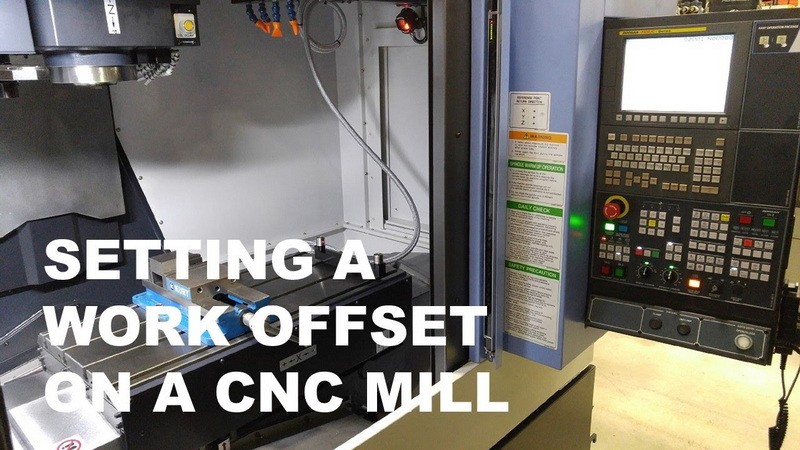
Work coordinate systems (such as G54, G55, etc.) define the origin of your CNC milling program relative to the actual workpiece position on the table or pallet. Accurately setting these coordinates is essential.
Use an edge finder, probe, or dial indicator to locate a reference corner, hole, or feature on the workpiece or fixture. Zero out the machine position for X, Y, and Z at this location and write these values into the corresponding work offset.
For multi-pallet or multi-fixture setups, define a separate work offset for each location. This practice allows you to run different parts or multiple identical parts in parallel CNC milling operations with minimal reprogramming.
With mechanical setup, lubrication, and workholding in place, you can begin the homing process. Power up the servos and home each axis so the control knows the exact machine zero.
Jog each axis through its full travel slowly, listening for unusual noises and feeling for vibration or binding. Smooth, consistent movement indicates that rails, ballscrews, and servo tuning are in good condition for CNC milling.
Check that travel limits are correctly set and that overtravel switches trigger alarms when intentionally approached. This provides a final safety layer to protect the machine and tooling from crashes.
Create or obtain the CNC milling program using CAM software or manual programming. Define tools, work offsets, spindle speeds, feed rates, and coolant commands within the program.
Transfer the G-code to the control using USB, network, or DNC. Before running any program on a horizontal CNC milling machine, review it in the controller's graphics simulation or backplot mode.
Check for collisions with fixtures, tables, and tombstones, and verify tool call order, spindle direction, and coolant states. This step prevents many common errors during the first run.
Cutting parameters in CNC milling, such as spindle speed, feed rate, radial and axial depth of cut, directly influence tool life, surface finish, and cycle time. Start with tooling manufacturer recommendations based on material and cutter type.
Adjust spindle speed to balance chip formation and heat generation, then set feed rate to achieve proper chip thickness without overloading the tool. Depths of cut should consider machine rigidity, workholding strength, and part geometry.
For roughing passes, prioritize material removal rate, while finishing passes favor lower feed and shallow depths to achieve the desired surface finish. Always verify that the horizontal CNC milling machine and spindle power can handle the chosen parameters.
Before cutting a production part, perform a dry run with the spindle off and the tool elevated above the workpiece. Watch carefully for clearance around fixtures, clamps, and machine structures.
Once the dry run looks safe, perform a light test cut on scrap material or a test block mounted in the same workholding. Measure critical dimensions and compare them to the programmed values.
If necessary, refine offsets, tool compensation, or cutting parameters. This iterative process ensures that the CNC milling setup produces accurate parts before valuable material is machined.
Coolant plays a vital role in chip evacuation, temperature control, and tool life. Horizontal CNC milling machines usually benefit from flood coolant, high-pressure coolant, or through-spindle systems that deliver fluid directly to the cutting zone.
Aim the nozzles or program internal coolant to flush chips away from the cut and prevent recutting. Monitor coolant concentration with a refractometer and maintain it at the recommended level to avoid rust, foaming, or poor lubrication.
Regularly clean filters, skimmers, and tanks to remove tramp oil and chips. Good coolant management leads to more stable CNC milling conditions and reduces downtime from clogged lines or pump failures.
After initial setup, routine inspections help maintain the accuracy of your horizontal CNC milling machine. Periodically check machine level, axis backlash, spindle runout, and fixture alignment.
Run calibration routines with probing cycles or test artifacts to confirm that positional accuracy and repeatability are within specification. If errors appear, update compensation values or schedule professional service.
Consistent calibration supports tight tolerances and reduces scrap in long-term CNC milling production.
Preventive maintenance keeps your CNC milling machine reliable and safe. Daily tasks typically include cleaning chips from enclosures, checking lubrication levels, monitoring coolant, and inspecting toolholders and pull studs.
Weekly and monthly tasks can include inspecting belts and couplings, verifying hydraulic pressures, cleaning filters and fans, and checking axis covers and way wipers. Annually, many shops schedule comprehensive inspections of spindles, bearings, electrical cabinets, and alignment.
By following a structured maintenance schedule, you extend machine life, protect your investment, and maintain consistent CNC milling quality.
Even with a careful setup, issues may arise. Poor surface finish may indicate dull tools, incorrect speeds and feeds, or vibration due to loose fixtures or machine leveling issues.
Dimensional inaccuracies might point to wrong tool offsets, slip in workholding, backlash, or thermal drift. Unexpected alarms can result from limit switches, lubrication faults, or coolant level sensors.
Approach troubleshooting systematically: verify mechanical condition first, then review offsets and programs, and finally inspect electrical or sensor-related systems. This methodical approach minimizes downtime in CNC milling operations.
Learning how to set up a horizontal CNC milling machine is a foundational skill for any shop that relies on CNC milling for precision production. From site preparation and machine leveling to tool offsets, workholding, programming, and maintenance, every step contributes to accuracy, safety, and efficiency. When you follow a structured process and pay attention to detail, your horizontal CNC milling machine becomes a powerful, reliable asset capable of delivering high-quality parts shift after shift.
Contact us to get more information!
The first step is preparing a suitable installation site with a stable foundation, proper environment, and adequate space, then positioning and roughly leveling the machine before any power or tooling is added.
You level the machine using a precision machinist level placed on reference surfaces, adjusting leveling screws until readings are within tolerance along all axes, then rechecking after grouting or final anchoring.
Tool length offsets allow the controller to know the exact position of each tool tip relative to machine and work coordinates, ensuring correct depths, avoiding collisions, and achieving consistent part dimensions.
Common workholding options include pallets with vises, fixture plates, and tombstones that hold multiple parts on several faces, enabling efficient multi-side CNC milling without frequent re-clamping.
You test the setup through homing, dry runs above the workpiece, light test cuts on scrap, and careful dimensional inspection, making fine adjustments to offsets and parameters until parts meet specification.
1. https://cncwmt.com/latest-news/how-to-set-up-cnc-milling-machine-wmt-cnc-china/
2. https://legacywoodworking.com/cnc-training/episode-1-set-up-horizontal-workstation/
3. https://www.oturnmachinery.com/news/cnc-horizontal-machining-center-installation-and-commissioning-guide/
4. https://en.catocnc.com/news_details/32.html
5. https://www.cncmachiningptj.com/article-1282.html
6. https://www.reidsupply.com/en-us/industry-news/machine-leveling-procedure
7. https://www.elephant-cnc.com/blog/cnc-milling-machine-process/
8. https://cnccookbook.com/cnc-machine-setup-setting-procedure-lathe-milling/
9. https://cncwmt.com/latest-news/how-to-set-up-cnc-milling-machine-wmt-cnc-china/
10. https://www.greatcncmachine.com/blog/how-to-set-up-the-work-coordinate-system-in-a-horizontal-cnc-mill-400761.html
11. https://www.3erp.com/blog/cnc-workholding-methods/
12. https://fractory.com/horizontal-vs-vertical-milling/
13. https://antishilathe.com/blog/milling-machines-and-cnc-mills-safety-precautions-every-operator-should-know/
14. https://eworkorders.com/cmms-industry-articles-eworkorders/cnc-maintenance-checklist/
15. https://www.fictiv.com/articles/cnc-machine-safety-essentials-our-best-tips


