From idea to market-ready product, our NPI solutions make every stage easier, faster. Discover How We Help

Views: 222 Author: Tomorrow Publish Time: 2025-11-30 Origin: Site


Content Menu
● Understanding CNC Turning Basics
● Power-Up, Homing, and Warm-Up
● Loading and Managing Programs
● Workholding and Chuck Preparation
● Clamping and Aligning the Workpiece
● Tool Selection and Turret Setup
● Tool Geometry and Nose Radius
● Coolant Use and Chip Control
● First-piece Trial and Inspection
● Tool Wear Monitoring and Change Strategy
● Troubleshooting Common Turning Issues
● Developing Standardized Procedures
● Training and Skill Development
● Integration with Production Planning
● FAQ
>> 1. What is the basic working principle of a CNC turning machine?
>> 2. How do you set tool offsets on a CNC lathe?
>> 3. Why is a dry run important before production?
>> 4. What common problems occur during CNC turning?
>> 5. How often should a CNC turning machine be maintained?
Operating a CNC turning machine requires structured steps: understanding the machine, following strict safety rules, preparing programs, setting up workholding and tools, verifying offsets, running trial cuts, then controlling quality and maintenance during production. A consistent, documented workflow helps new operators build confidence and reduces risk of scrap or accidents.

CNC turning is a machining process in which a rotating workpiece is shaped by a stationary or linearly moving cutting tool to produce shafts, bushings, rings, and threaded parts. The CNC control interprets a program (G-code) and coordinates spindle rotation, axis motion, tool changes, and auxiliary functions.
Most turning machines have at least two linear axes: X (radial) and Z (axial), plus the spindle as axis C for rotation. More advanced turning centers may add Y axis and live tools, enabling milling operations such as flats, slots, and cross-holes in the same setup.
Key components include the headstock with spindle and chuck, which provides controlled rotation and clamping of the workpiece. The bed supports the carriage and turret, while linear guideways and ball screws move the axes with high precision.
The tool turret or tool post holds multiple tools and indexes automatically to bring the required tool into the cutting position. Additional systems such as coolant, chip conveyor, hydraulic unit, lubrication unit, and enclosure support stable, safe operation and longer component life.
Before any operation, ensure proper personal protective equipment such as safety glasses, protective footwear, and snug clothing without loose sleeves or jewelry. Hair should be secured, and gloves should never be worn near rotating parts.
Check that safety guards and doors are closed whenever the spindle or automatic cycle is active. Verify emergency stop functionality, confirm that interlocks are not bypassed, and keep the work area clean and free from oil spills, loose tools, and chips that could obstruct axis motion.
Start the machine following the manufacturer's power-up sequence, allowing the control to complete self-tests. Once powered, perform a homing or reference cycle so each axis moves to its reference switch and the control sets machine coordinates.
Run a spindle and axis warm-up routine, especially on cold starts, to stabilize temperatures and distribute lubrication. During this stage, check coolant level and concentration, verify hydraulic pressure or chuck pressure, and confirm that lubrication and air systems are functioning.
A CNC turning program consists mainly of G-code and M-code instructions that define movements, spindle functions, coolant, tool changes, and cycle control. Basic turning programs generally include:
- Initialization block (units, plane, compensation modes).
- Tool call with spindle speed and coolant command.
- Roughing, finishing, threading, grooving, and drilling cycles.
- Return-to-safe position and program end commands.
Programs can be created by manual coding or generated from CAM software using a post-processor tailored to the control. New operators should learn how to read key commands, verify tool numbers, check work and tool offset calls, and recognize canned cycles for turning and threading.
Programs are usually loaded via network connection, USB drive, or direct manual entry. Use clear naming conventions and version control so changes can be traced and older versions restored when needed.
Before executing a new or modified program, perform an on-screen check: scroll through the code to confirm that spindle speeds, feeds, tool numbers, and offset numbers match the setup on the machine. Pay special attention to rapid moves, clearance positions, and any macro calls or subprogram calls.
Choose appropriate workholding according to part size, geometry, and production volume. Options include three-jaw chucks for general work, collet chucks for small and precise parts, and special jaws or fixtures for irregular or thin-walled components.
Inspect and clean the chuck or collet, ensuring all chips and debris are removed from jaws and seating surfaces. Check that the chuck is securely mounted, jaw bolts are properly tightened, and maximum rated speed for the chuck is not exceeded in the program.
Insert the workpiece to the required depth and seat it against a stop or locator to control length position. Apply suitable clamping pressure: too low may cause slippage, and too high can distort thin-walled parts.
Rotate the spindle slowly and visually check for excessive runout. For tight tolerances, use a dial indicator to measure and correct runout. Long parts may require support from a tailstock, steady rest, or follow rest to avoid deflection and chatter.
Select tools according to the material, operation type, and required surface finish. A typical setup includes:
- Roughing and finishing turning inserts.
- Facing tool.
- Grooving and parting tools.
- Threading tool.
- Drills and boring bars for internal features.
Install each tool into the turret station specified by the program. Minimize overhang to increase rigidity and reduce vibration. Confirm that each station is secured, that tools clear the chuck and tailstock, and that tool identification in the control matches physical locations.
Each insert has geometry (rake, chipbreaker) and nose radius that affect cutting forces, chip formation, and surface finish. Larger nose radii usually allow higher feed rates and stronger cutting edges but can increase radial forces and risk chatter.
When setting up programs or using canned cycles, ensure the tool nose radius in the offset table matches the actual insert. This allows the control to correctly apply tool nose radius compensation and maintain accurate part geometry, especially on tapers and contours.
The work offset defines the relationship between the machine coordinate system and the part zero (usually on the face and centerline of the workpiece). In most lathes, Z zero is set at the finished front face; X zero corresponds to the spindle centerline.
To set Z, bring a reference tool to touch off on the workpiece face and set the Z value in the work offset page to zero (or the drawing reference value). To set X, turn a small diameter, measure it, and adjust the X offset so the display matches the actual diameter. Repeat as needed to refine accuracy.
Each tool requires length and possibly radius offsets. Use one of these approaches:
- Touch each tool to the same reference face and diameter, then record the offset values in the tool offset table.
- Use an offline tool presetter to measure tools and input measured data.
- Use an in-machine probe if available.
Confirm tool offset directions: on a lathe, X moves are in radius or diameter mode depending on the control setting, so ensure offsets align with this convention. Carefully document which reference tool was used so future setups can follow the same method.
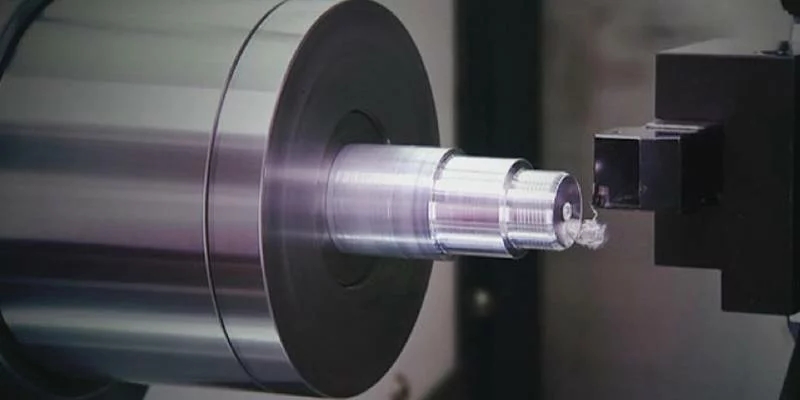
Cutting speed, feed rate, and depth of cut depend on material, insert grade, tool geometry, and machine rigidity. Basic guidelines:
- Use recommended surface speed (m/min or sfm) from tool or material data, then convert to spindle RPM based on part diameter.
- Select a moderate feed per revolution that balances cycle time with finish quality.
- Use smaller depth of cut for finishing operations and larger depth of cut for roughing when rigidity allows.
Always start conservatively when running a new job or using a new tool. Increase speed and feed gradually while monitoring spindle load, sound, chip shape, and surface finish.
Coolant helps control temperature, extend tool life, and improve chip evacuation. Direct the nozzle to the cutting zone so coolant reaches the tool–chip interface, especially in deep grooves and bores.
Chip control is critical in turning because continuous chips can wrap around the part or tool. Choose inserts with appropriate chipbreakers and adjust feed and depth of cut to encourage shorter, curled chips. Periodically clear built-up chips and ensure the chip conveyor or auger is functioning properly.
Before cutting material, perform a dry run or simulation:
- Run the program with spindle off or at reduced speed.
- Use single-block mode and optional stop to verify each movement.
- Observe clearances around chuck, tailstock, turret, and enclosure.
This step helps catch wrong tool numbers, incorrect offsets, or unexpected rapid moves. Make any necessary corrections to tool positions, offsets, or safe approach and retract points before proceeding to a real cut.
On the first piece, run the program at reduced speeds and feeds, staying alert for vibrations, abnormal sounds, or alarms. After completion:
- Deburr the part carefully.
- Measure all critical features: diameters, lengths, threads, grooves, and chamfers.
- Compare results with the drawing or specification.
If dimensions are slightly off, adjust tool offsets rather than editing geometry unless there is a programming mistake. Record the amount of offset change for traceability and so future setups can use similar baseline settings.
When the first-piece inspection is acceptable, switch to full production settings. At this stage the operator focuses on:
- Consistent loading and unloading of parts.
- Monitoring coolant level, chip buildup, and spindle load.
- Listening for changes in sound that may indicate tool wear or mechanical issues.
Use a sampling plan for in-process inspection: check critical dimensions every set number of parts, more often for tight-tolerance features. If drift occurs, adjust offsets in small steps and review temperature, workholding, and tool wear.
Develop a tool-life strategy based on experience or supplier recommendations. Options include:
- Time-based changes: replace inserts after a defined cutting time or part count.
- Condition-based changes: replace when surface finish degrades, forces increase, or dimension trend reaches a threshold.
- Mixed approach: use both time and condition triggers for critical tools.
Record wear patterns and typical life for each tool in a setup sheet. This helps schedule tool changes to avoid sudden failure that might damage the part or the machine.
Several typical issues arise during CNC turning:
- Chatter and vibration: may be caused by long tool overhang, insufficient support, or aggressive cutting parameters. Solutions include shortening overhang, increasing rigidity, lowering speed, or changing cutting edge geometry.
- Poor surface finish: can result from worn tools, too high feed, incorrect nose radius, or contaminated coolant. Improve by changing inserts, reducing feed, adjusting nose radius, or refreshing coolant.
- Taper or size drift: often linked to thermal growth, loose workholding, or misaligned offsets. Allow machine warm-up, check clamping, re-home axes if necessary, and retouch offsets.
Document each problem and corrective action so future operators can benefit from previous troubleshooting experience.
To operate CNC turning machines consistently across shifts and operators, create standardized documents:
- Setup sheets listing tool numbers, offsets, jaws, chuck pressure, and cutting data.
- Checklists for power-up, homing, and warm-up.
- Inspection plans and recording templates for key dimensions.
- Maintenance checklists and intervals for cleaning, lubrication, and inspection.
Standardization reduces errors, shortens setup time, and makes training new operators more efficient.
New operators should start with basic theory, machine controls, and safety rules, then gradually move to supervised setup and operation. Hands-on practice in reading programs, setting offsets, and performing measurements is essential.
Encourage continuous learning about new insert grades, advanced tooling strategies, and control features such as canned cycles, macros, and probing. Over time, operators can progress from simple jobs to complex multi-axis turning and lights-out production planning.
Operating a CNC turning machine effectively also means coordinating with upstream and downstream processes. Integrate:
- Raw material preparation and inspection before loading.
- Tool crib management so required tools and inserts are available.
- Packaging, labeling, and documentation of finished parts.
Clear communication with planning and quality departments ensures that program revisions, drawing changes, and tolerance updates are reflected promptly on the machine.
Operating a CNC turning machine successfully requires a systematic approach that begins with safety and basic understanding of machine structure and control. By using proper workholding, carefully setting work and tool offsets, choosing suitable cutting data, and performing safe dry runs and first-piece inspections, operators can greatly reduce the risk of crashes and scrap.
Once production is underway, continuous monitoring of tool wear, dimensional stability, chip control, and coolant condition keeps the process stable. Standardized procedures, regular maintenance, and ongoing training allow CNC turning machines to deliver high-quality, repeatable parts across a wide range of materials and part geometries.
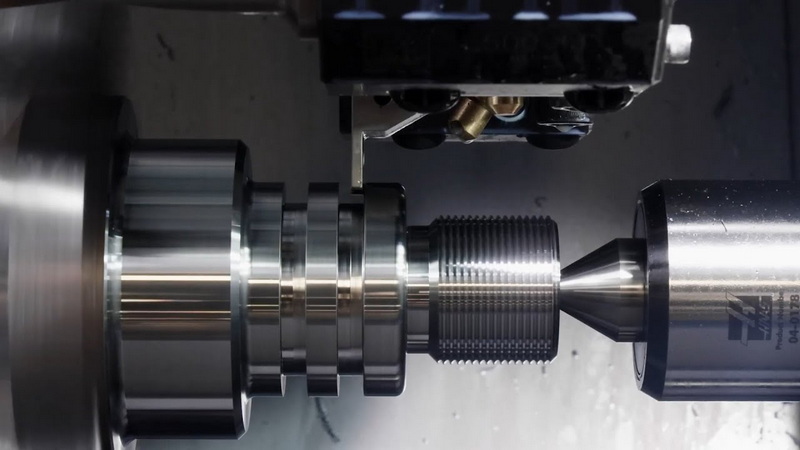
A CNC turning machine rotates the workpiece in a spindle while fixed or linearly moving tools remove material to form cylindrical or conical shapes. The CNC control interprets a program to coordinate spindle speed, tool position, and auxiliary functions, ensuring accurate, repeatable machining.
Tool offsets are set by touching each tool to a known reference surface and recording the resulting X and Z positions in the tool offset table. You can use the workpiece, a reference block, or a tool presetter as the datum, then refine offsets by cutting and measuring a test feature and adjusting values until the machine's readout matches the actual part.
A dry run lets you verify the program path, tool changes, and clearances without risking damage to the part, tooling, or machine. By running at reduced speeds with the spindle off or lightly loaded, you can detect incorrect offsets, unsafe rapid moves, and programming mistakes before cutting real material.
Common problems include chatter, poor surface finish, dimensional drift, excessive tool wear, chip packing, and part distortion due to improper clamping. These typically stem from incorrect cutting parameters, inadequate rigidity, worn tools or components, or unstable workholding, and are fixed by adjusting setups, tools, or process parameters.
Daily tasks include cleaning chips, checking coolant level, and visually inspecting for leaks or damage. Weekly and monthly routines cover lubrication checks, filter cleaning, and basic mechanical inspections, while more detailed checks on spindle condition, axis alignment, and backlash are usually scheduled quarterly or annually based on usage and machine criticality.
[1](https://www.elephant-cnc.com/blog/cnc-machine-troubleshooting/)
[2](https://toolstoday.com/learn/troubleshooting-cnc-machine-problems)
[3](https://gesrepair.com/common-cnc-machine-failures/)
[4](https://hwacheonasia.com/10-common-problems-with-cnc-machine-tools-and-how-to-fix-them/)
[5](https://www.youtube.com/watch?v=V4URrBztvpk)
[6](https://www.americanmicroinc.com/resources/troubleshooting-tips-cnc-machining-issues/)
[7](https://www.newequipment.com/learning-center/article/21248494/7-common-issues-in-setup-and-maintenance-of-cnc-machines-and-ways-to-fix-them)
[8](https://atecentral.net/downloads/33975/Bridgerland's%20Machining%20Troubleshooting%20Guidebook.pdf)
[9](https://www.sandvik.coromant.com/en-us/knowledge/general-turning/troubleshooting-turning)
[10](https://www.frog3d.com/cnc-machine-problems-and-solutions/)


