From idea to market-ready product, our NPI solutions make every stage easier, faster. Discover How We Help

Views: 222 Author: Tomorrow Publish Time: 2025-12-16 Origin: Site


Content Menu
● Introduction to CNC Milling Machines
● Understanding the CNC Milling Process
● Step-by-Step Guide to Operating a CNC Milling Machine
>> Step 1: Know the Machine's Main Components
>> Step 2: Prepare the Environment and Safety Setup
>> Step 3: Mount the Tool and Workpiece
>> Step 4: Power Up and Initialize the Machine
>> Step 5: Upload and Verify the CNC Program
>> Step 6: Define Work Coordinate System and Tool Offsets
>> Step 7: Run a Simulation or Dry Test
>> Step 8: Perform the Machining Operation
>> Step 9: Inspect and Validate the Finished Part
>> Step 10: Maintenance and Power Down Procedure
● Safety Practices in CNC Milling Operations
● Troubleshooting Common CNC Milling Problems
● Learning CNC Operation through PDF Resources
● Advanced Tips for Professional CNC Milling
● Importance of Continuous Training and Documentation
● FAQ
>> 1. What type of software is essential for CNC milling?
>> 2. How do I optimize machining speed and tool life?
>> 3. Can CNC milling machines work with materials other than metal?
>> 4. Why are offsets critical in CNC machining?
>> 5. How can PDF manuals benefit CNC learners?
Operating a CNC milling machine is a fundamental skill in modern manufacturing and precision engineering. It involves converting digital designs into tangible products with outstanding accuracy, consistency, and repeatability. These machines follow pre-programmed instructions to perform complex tasks such as drilling, cutting, and shaping materials. In this detailed guide, you will learn step-by-step how to operate a CNC milling machine, accompanied by essential theory, safety practices, and practical advice for better efficiency and product quality.

A CNC (Computer Numerical Control) milling machine automates the control of cutting tools through programmed commands. Unlike manual milling, CNC operations rely on data-driven processes, which drastically reduce human error and increase repeatability. The machine reads G-code—an industry-standard programming language—that specifies the movement, rotation, and depth of cuts.
This technology plays a central role in modern production lines in industries including aerospace, automotive, electronics, and medical device manufacturing. Learning how to operate CNC equipment not only enhances workshop skills but also opens opportunities in advanced manufacturing fields where precision is essential.
CNC milling converts digital designs into physical objects using automated linear and rotational tools. The process involves several integrated stages that must occur in sequence for successful output:
1. Design Creation (CAD). Engineers or designers use CAD software to create a 2D sketch or 3D model of the part.
2. Toolpath Generation (CAM). CAM software translates the CAD model into instructions or G-code that define the tool's path.
3. Machine Setup. The operator installs the cutting tool, mounts the workpiece, and configures offsets.
4. Execution. The CNC follows the uploaded program to shape the raw material into the final component.
5. Inspection. The finished part undergoes dimensional verification to ensure it meets design tolerances.
Each stage demands attention to both software and mechanical accuracy. A single programming error or setup mistake can compromise the part's integrity.
Before touching the control panel, understand the primary sections of your CNC milling machine:
- Spindle: Drives the cutting tool, powered by an electric motor.
- Tool Holder: Grips the cutting tool securely to prevent vibration.
- Worktable: Surface where the material or workpiece is fixed.
- Axes (X, Y, Z): Define three-directional movement; advanced machines may include A or B rotational axes.
- Control Panel: Contains the interface for loading programs, adjusting speed, and monitoring operation.
- Coolant System: Circulates liquid to minimize heat and remove chips.
- Lubrication System: Prevents wear and ensures smooth motion in slides and bearings.
A solid grasp of these parts helps in diagnosing problems, setting up efficiently, and boosting confidence as an operator.
A clean, organized workspace ensures operational safety and accuracy. Start by verifying that all safety doors and guards are locked. Remove unnecessary materials from the machine bed. Wear PPE — safety glasses, steel-toed boots, gloves, and an apron. Avoid long sleeves, jewelry, or loose clothing that could be caught in rotating parts.
Check the coolant reservoir level, verify electrical connections, and ensure emergency stop buttons function correctly. A well-prepared workstation reduces accidents and errors significantly.
Use the correct cutting tool for the job type—end mills, face mills, drills, or ball cutters. Insert the tool into the holder and tighten using a torque wrench to maintain stability. Then mount the workpiece securely on the machine bed with clamps, vises, or vacuum fixtures. Double-check alignment with a dial indicator or edge finder. Proper clamping prevents chatter, slippage, and dimensional inaccuracy.
After confirming the physical setup, power up the system and run a reference return (homing cycle). This step ensures the CNC knows the origin point for each axis. Initialization also activates accessory systems like coolant control, lubrication, and spindle orientation.
If your CNC has automatic tool changers (ATC), verify the magazine position and ensure each tool matches the tool number in your program's tool list.
CNC programs can be transferred using USB, Ethernet, or direct network connections. Once loaded into the machine controller, preview the code. Inspect for missing M-codes or incomplete tool definitions. Some advanced machines allow you to visualize the program's toolpath directly on the screen. Simulation helps prevent collisions and reduces waste.
If needed, edit parameters such as spindle speed (S command) or feed rate (F command) based on the type of material and cutting conditions.
Offsets establish the spatial relationship between the machine's home position and the actual workpiece. Using probing tools, find the X, Y, and Z zero points. Enter these into the work offset register (commonly G54 to G59). Then measure each tool's length using a tool presetter. Input those values into the tool offset table so the CNC machine compensates automatically for different tool lengths.
Precision in this step directly affects dimensional accuracy and surface finish.
Before producing chips, execute the program in a “dry run” mode where the spindle and feed are active but without engaging the tool into the material. Observe tool movement carefully; ensure adequate clearance from clamps and fixture components. Make incremental adjustments if necessary. This safety check can save valuable materials and prevent machine damage.
Start the actual cutting procedure by activating the spindle and enabling coolant flow. Gradually ramp up spindle speed according to the job's parameters. Monitor cutting temperatures, chip color, and vibration levels. Operators should remain alert to abnormal sounds that might signal tool breakage or excessive load.
Adjust feed rate and spindle speed dynamically if your control allows real-time override—it's a useful feature for optimizing cutting performance.
Once machining finishes, remove the workpiece carefully and clean residual coolant and chips. Measure the part using micrometers, height gauges, or coordinate measuring machines (CMM). Compare results against blueprint dimensions. Record deviations, if any, and update offset corrections for subsequent operations. Quality control ensures that each component matches tolerance requirements, reducing waste and rework.
A disciplined maintenance routine prolongs machine life and improves consistency. Follow these after each job:
- Clean chips and wipe surfaces with machine-grade cloths.
- Check tool wear and replace dull cutters.
- Empty chip trays and refill coolant when needed.
- Inspect belts, slides, and lubrication points weekly.
- Keep detailed maintenance logs for audit and calibration purposes.
Finally, shut down the system in the correct order: spindle, coolant pump, controller, and main power switch. Lockout procedures prevent accidental startups.
CNC machines can cause severe injury if mishandled. Always treat them with respect and awareness:
- Never reach into the machining area when the spindle is rotating.
- Stop operation immediately if an abnormal sound or vibration occurs.
- Familiarize yourself with the emergency stop button before operation.
- Use chip guards and air blowers cautiously to avoid chip projection.
- Keep fire extinguishers rated for electrical and oil fires close by.
- Schedule periodic safety briefings for all machine operators.
Proactive safety habits protect not only personnel but also new learners who might observe the machining process for educational purposes.
Despite careful setup, problems occasionally arise. Here's how to identify and correct them:
- Surface finish defects: May result from dull tools or improper spindle speed; adjust feed and replace the tool.
- Overcutting: Indicates incorrect tool offset; remeasure and update the length data.
- Machine vibration: Tighten fixtures or reduce depth per pass.
- G-code alarms: Review syntax in the uploaded file; verify that each tool call and safety command (e.g., G17, G40, G80) is present.
- Poor chip evacuation: Check nozzle alignment or coolant mixture ratio.
Quick diagnostic skills minimize downtime and material waste, maintaining production efficiency.
CNC operation manuals in PDF format provide a convenient learning approach. These resources let users study machine functions, M-code and G-code libraries, maintenance schedules, and tool charts anytime—whether online or offline. A good CNC PDF guide includes illustrations, reference charts, and troubleshooting sections.
For industrial training, such documents often serve as standardized learning modules, ensuring all operators follow consistent operating protocols. Enterprises frequently supply their custom machine-specific PDF manuals that match brand and model variations such as Haas, Fanuc, or Siemens control systems.
After mastering basic procedures, skilled machinists can refine productivity using advanced techniques:
- Adaptive Clearing Toolpaths: Reduces tool load by keeping a constant chip thickness.
- High-Speed Machining (HSM): Increases spindle RPM and feed rate for smooth, efficient material removal.
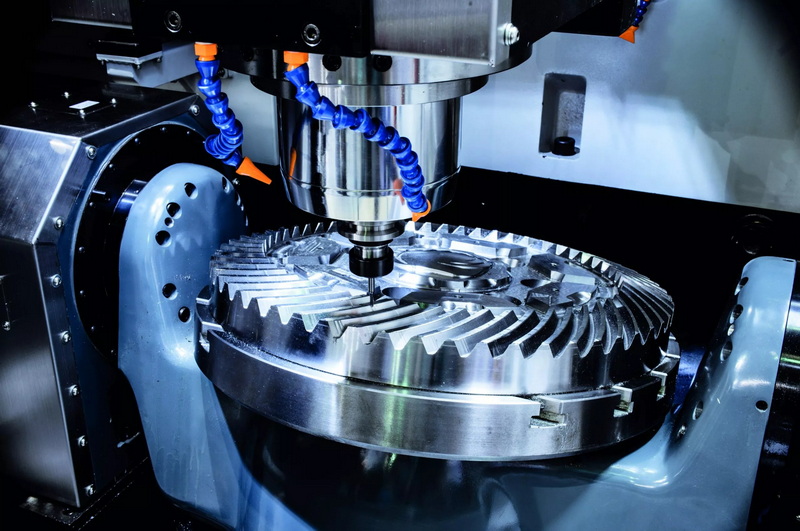
- Multi-Axis Machining: Adds A and B rotational axes for producing complex surfaces such as turbine blades.
- Tool Life Monitoring: Sensors track wear automatically and alert the operator when replacement is due.
- Smart Fixture Systems: Employ zero-point clamping or modular setups to decrease setup times.
- Real-Time Data Integration: Connects CNC machines to monitoring software for performance analytics.
Implementing these advanced strategies enhances precision, reduces machining time, and supports continuous improvement initiatives.
The world of CNC machining evolves rapidly with new technologies such as AI-assisted programming, digital twins, and automated quality monitoring. Keeping updated through workshops, certification programs, and technical PDFs allows operators to remain competitive.
Maintaining detailed documentation — machine logs, calibration reports, and process settings — ensures continuity in production even when operators change shifts. Knowledge preservation is just as important as skill development in a professional manufacturing environment.
Operating a CNC milling machine goes far beyond pressing buttons; it merges technical understanding, careful setup, and hands-on skill. Mastering these machines empowers manufacturers to create intricate, high-quality components while minimizing defects and waste. By following structured processes, adhering to safety protocols, and using educational resources available in PDF form, any dedicated learner can achieve professional-level proficiency in CNC milling.
Whether you are a student, machinist, or workshop supervisor, consistent practice and reference to well-structured manuals will help you reach operational excellence and efficiency.
Operators typically use CAD software to design parts and CAM software to generate toolpaths. Examples include SolidWorks, Autodesk Fusion 360, and Mastercam.
Use manufacturer-recommended speed and feed charts, apply consistent coolant, and perform frequent tool inspections. Adjust speed according to material hardness.
Yes. CNC mills can handle plastics, wood, foam, and composites, though parameters must be adjusted for material density and thermal properties.
Offsets define exact reference points for both the tool and workpiece, ensuring every part maintains precise dimensions during repeated operations.
PDF resources provide standardized, portable information including operation steps, troubleshooting charts, and safety guidelines, suitable for both beginners and professionals.


