From idea to market-ready product, our NPI solutions make every stage easier, faster. Discover How We Help

Views: 222 Author: Tomorrow Publish Time: 2025-12-16 Origin: Site


Content Menu
● Understanding What a CNC Milling Machine Is
● Planning Your CNC Milling Machine
● Choosing the Right Design Type
>> 2. Moving Table (Bridgeport Style)
● Essential Components of a CNC Milling Machine
>> 4. Spindle and Cutting Tools
>> 5. Electronics and Controller
● Building Your CNC Milling Machine Step by Step
>> Step 1: Build and Square the Frame
>> Step 2: Mount Linear Rails and Screws
>> Step 3: Assemble Axis Carriages
>> Step 4: Install Motors and Couplings
>> Step 6: Wire the Electronics
>> Step 7: Set Up Software and Calibration
>> Step 8: Perform Dry Runs and Test Cuts
● Fine-Tuning and Performance Optimization
● Example Materials You Can Cut
● Environmental and Efficiency Considerations
● FAQ
>> 1. What is the easiest type of CNC milling machine to build?
>> 2. What type of motors are best for a DIY CNC?
>> 3. How accurate can a homemade CNC milling machine be?
>> 4. Which software should I use to control my CNC?
>> 5. How much does it cost to build one?
Building your own CNC milling machine is one of the most exciting and valuable DIY projects for anyone interested in engineering, manufacturing, or design. By constructing a CNC from scratch, you'll learn the fundamentals of mechanical systems, electronics, software, and computer aided manufacturing. You'll also end up with a machine capable of producing precise, repeatable parts that rival those made by commercial systems—at a fraction of the cost.
In this detailed guide, we'll walk through everything you need to know to make your own CNC milling machine—from conceptual design to full assembly, calibration, and testing. You'll discover what components are essential, how to choose the right ones, and how to combine them into a stable, reliable system that suits your personal or business needs.

CNC stands for Computer Numerical Control. A CNC milling machine automates the precise movement of a rotating cutting tool along several axes to shape materials such as wood, plastic, and metals. Unlike manual milling, which relies on hand movements, a CNC uses G code instructions generated by software to drive motors that move the tool or workpiece with extreme accuracy.
Most CNC milling machines operate with three main axes:
- X-axis: Side to side movement of the table.
- Y-axis: Front to back motion.
- Z-axis: Vertical movement of the spindle and cutting tool.
Modern CNC systems can include additional axes for rotation or tilt, but for a first build, a standard 3 axis design offers simplicity and flexibility.
Before purchasing parts or cutting your first piece of metal, plan your design carefully. The planning phase determines whether your machine will perform smoothly or struggle later.
Clarify what you expect the machine to do. Some users build CNCs for woodworking, sign making, or 3D carving, while others aim to machine metals for prototype components. Each material demands different rigidity, spindle speed, and power.
If you plan to cut aluminum or harder materials, you'll need a sturdier frame and higher torque motors. For plastics or wood, a lighter system with a focus on speed may be ideal.
Select your desired cutting area. A common hobby size is 300×300×100 mm, but larger working volumes, such as 600×400 mm, are better for furniture or large prototypes. Remember that a larger work area also increases structural demands and cost.
Set a realistic budget. Entry level machines can be built for around $800–$1200, though high performance systems may exceed $2000 depending on the hardware. Understanding your budget early helps you balance between affordability and quality.
There are two popular design approaches for DIY CNCs:
In this configuration, the cutting head (spindle) moves over a stationary table. It's easier to construct and ideal for sheet materials. Most hobby CNC routers use this design.
Pros: Simpler construction, larger work area, and straightforward motion control.
Cons: Can suffer from gantry flex if not reinforced properly.
In this traditional milling layout, the table moves in the X and Y directions while the spindle moves vertically.
Pros: High rigidity and precision; better for metal machining.
Cons: Heavier components, more expensive frame construction.
Every CNC milling machine integrates mechanical, electronic, and software systems. Below are the major elements you'll need to gather.
The frame holds everything together. Its stiffness directly affects cutting accuracy and overall machine performance.
Material choices include:
- Aluminum extrusions (e.g., 8020 profiles): Lightweight and modular. Perfect for hobbyists.
- Steel or welded frames: Offer maximum rigidity for metal cutting, though harder to fabricate.
- Cast iron or epoxy granite beds: Excellent vibration damping, used in industrial machines.
Ensure all frame connections are square and secure. Even a 1 millimeter misalignment can cause significant machining errors.
Linear motion components translate the motor's rotation into straight movement. Smooth travel reduces errors and tool marks.
Key components:
- Ball screws: Highly efficient, minimal backlash, ideal for precision CNCs.
- Lead screws: Cheaper alternative, sufficient for light duty.
- Linear rails and bearings: Enable smooth, accurate movement along each axis. Choose known brands like Hiwin, THK, or Misumi for durability.
Motors drive each axis.
- Stepper motors move in fixed steps and are easy to control with inexpensive driver boards.
- Servo motors provide continuous feedback on position, allowing ultra precise and fast movement.
A typical 3 axis CNC uses NEMA 23 stepper motors for moderate torque and reliability. Match motor torque to the load created by the spindle and frame mass.
The spindle is the heart of your CNC—it spins the cutting tools that shape your material.
Options:
- Trim routers like Makita or DeWalt models for hobby use.
- Water cooled spindles rated 1.5–2.2 kW for quieter operation.
- Air cooled spindles for simplicity and easy installation.
Match spindle speed (measured in RPM) with material hardness and tool diameter. For example, soft materials require higher speeds, while metals prefer slower, more powerful cuts.
The control system converts G code from your computer into pulses that move each axis precisely.
Typical setup:
- Controller Board: Arduino running GRBL or a more advanced system using Mach3, Mach4, or LinuxCNC.
- Motor Drivers: Devices like TB6600 or DM542 drivers control stepper power.
- Power Supply: Usually 24–48 V DC depending on motor requirements.
- Limit Switches: Prevent crashes at the ends of travel.
- Emergency Stop: A safety must for cutting operations.
Your CNC workflow requires three main software stages:
1. CAD (Computer Aided Design): Design your part in software such as Fusion 360, SolidWorks, or FreeCAD.
2. CAM (Computer Aided Manufacturing): Convert CAD designs into G code toolpaths using Fusion 360 CAM, VCarve, or Estlcam.
3. Controller software: Send G code to your hardware via Candle, UGS, or Mach3 interface.
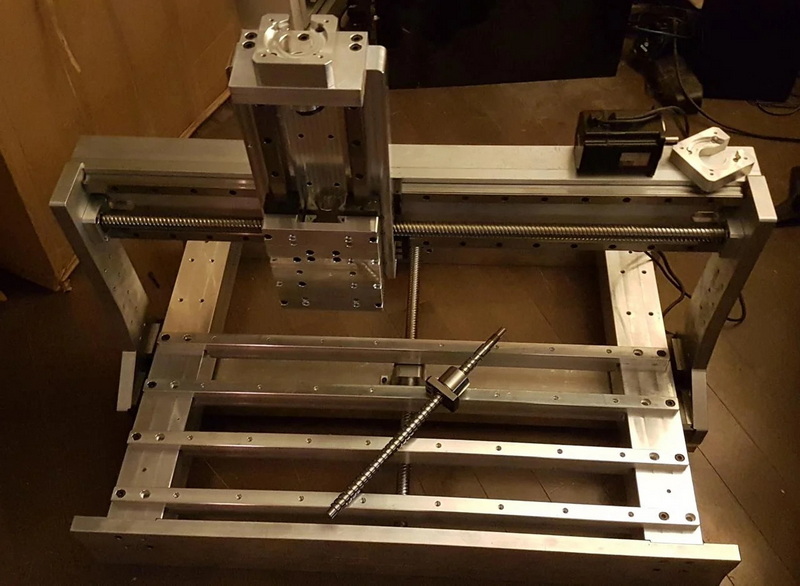
Begin by cutting all frame pieces to size, drilling holes for bolts, and mounting corner brackets. Use a digital caliper and square to ensure perfect right angles. A sturdy frame prevents vibrations and maintains accuracy.
Attach linear rails along the axes using precision shims to ensure straight alignment. Install ball or lead screws parallel to the rails. Rotate them manually to verify smooth movement without binding.
Install the bearing blocks that travel along each rail, connecting them via plates or aluminum mounts. Check that each axis slides smoothly throughout its range of motion.
Mount each stepper or servo motor using rigid brackets. Use flexible couplers between motor shafts and screws to accommodate small misalignments. Keep connections tight but not over stressed.
Attach the spindle assembly to the Z axis plate. Align it vertically using a machinist's square. Spindle misalignment can cause tapered or uneven cuts, so take extra care here.
Connect stepper drivers to the controller board following your wiring diagram. Label every wire for easy testing. Use shielded cables for motor and signal lines to reduce electrical noise. Mount all electronic components inside a ventilated control box.
Install controller software on your PC and connect it via USB. Configure motor driver parameters including steps per millimeter, acceleration, and maximum speed. Jog each axis to verify correct direction and movement distance.
To calibrate steps per millimeter:
Steps per mm = (Motor steps per revolution0 Microsteps )/ Lead screw pitch
Adjust values until the measured distance matches the commanded travel.
Before cutting real material, perform air moves (without the tool touching the stock) to ensure smooth operation. Then perform shallow cuts on foam or MDF. Gradually move to harder materials once operation is stable.
Operating a CNC involves sharp tools and electrical components. Always follow proper safety procedures:
- Wear eye and ear protection.
- Install a clear acrylic guard around the cutting area.
- Keep cables organized and away from moving parts.
- Use the emergency stop button immediately if unusual vibration or noise occurs.
- Never leave a running machine unattended.
Once basic operation is stable, focus on refinement.
- Backlash compensation: Adjust software settings to eliminate slack in screws or couplings.
- Feed rate optimization: Balance cutting speed, spindle speed, and tool type to minimize tool wear.
- Vibration damping: Add rubber pads or increase machine mass for smoother cuts.
- Toolpath strategy: Use climb milling for better surface finish in most materials.
You can also upgrade the machine later with automatic tool changers, touch probes for height sensing, or enclosures for dust control.
Consistent maintenance keeps your CNC reliable for years.
Daily: Remove chips and dust from rails and spindle.
Weekly: Inspect screws and bearings for smooth travel, re lubricate if necessary.
Monthly: Recheck calibration and tighten fasteners.
Replacing worn screws or bearings early prevents expensive damage later. Store your machine in a clean, dry environment to avoid corrosion.
Once operational, your CNC milling machine can handle a wide range of materials, such as:
- Wood: Create furniture parts, carvings, or molds.
- Acrylic and plastics: Produce panels, signs, or enclosures.
- Aluminum: Fabricate brackets, prototypes, or mechanical components.
- PCB boards: Engrave circuit traces for electronics projects.
Adjust spindle RPM and feed rates according to the hardness and melting point of each material.
Modern makers care not only about functionality but also sustainability. Building your own CNC allows you to:
- Use recyclable metals and responsible wooden materials.
- Implement energy saving stepper drivers with sleep modes.
- Recycle chips and reuse scrap materials.
- Reduce waste by cutting parts precisely to design specifications.
Efficient tool paths and correct speeds also minimize energy consumption and wear, making your setup both greener and more economical.
Creating your own CNC milling machine combines creativity, technical skill, and patience. It challenges you to solve real mechanical and electronic problems while rewarding you with a powerful fabrication tool that reflects your craftsmanship. From the first draft of a design to the satisfying moment when the spindle makes its first perfect cut, every step deepens your understanding of precision engineering.
Whether you use it for hobby projects, prototyping, or small scale production, a DIY CNC milling machine is an investment in both tools and knowledge. With careful assembly, proper calibration, and regular maintenance, your machine will deliver years of reliable service and open the door to endless innovations.
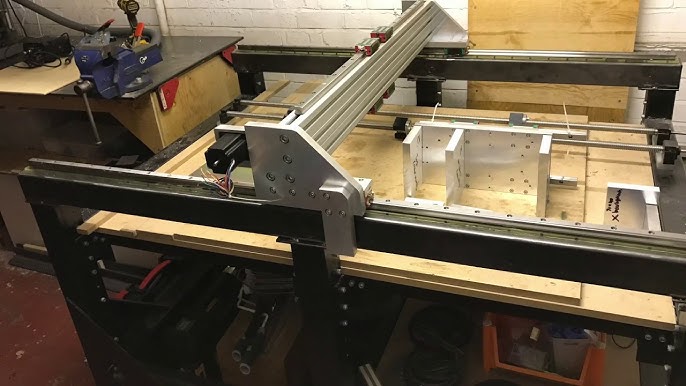
A gantry style CNC is typically the simplest for beginners. It requires fewer complex moving assemblies and provides a large working area suitable for wood and plastic.
NEMA 23 stepper motors are widely used because they're cost effective and strong enough for most desktop sized builds. Servo motors deliver higher performance if your budget allows.
With quality components and calibration, DIY CNCs can achieve tolerances around ±0.05 mm, sufficient for precise mechanical parts, prototypes, and artistic carvings.
Start with GRBL firmware and a free interface like Candle or Universal G code Sender. For advanced features, upgrade to Mach3, Mach4, or LinuxCNC.
A solid entry level build may cost about $700–$1200, while a professional grade machine with metal cutting ability ranges from $2000–$3000, depending on size and spindle quality.


