From idea to market-ready product, our NPI solutions make every stage easier, faster. Discover How We Help

Views: 222 Author: Tomorrow Publish Time: 2026-01-22 Origin: Site
Content Menu
● Understanding the Role of Fixtures in CNC Milling
● Tools Required for Indicating a Fixture
● Step-by-Step Process To Indicate a Fixture on a CNC Milling Router Table
>> Step 1: Clean the Table and Fixture Surface
>> Step 2: Position and Secure the Fixture
>> Step 3: Mount the Dial Indicator
>> Step 4: Sweep and Measure Deviation
>> Step 5: Repeat for the Y-axis
>> Step 6: Set Work Offset Coordinates
>> Step 7: Verify Repeatability
● Techniques to Achieve Higher Indicating Precision
● Common Errors When Indicating Fixtures
● Advanced Indication Methods in CNC Milling
● Importance of Fixture Indication for CNC Milling Efficiency
● Fixture Maintenance and Long-Term Care
● Real-World Example: Aluminum Router Fixture Alignment
● Safety Considerations During Indication
● Troubleshooting Alignment Issues
● FAQs About Indicating Fixtures on CNC Milling Router Tables
>> 1. What is the main purpose of indicating a fixture in CNC Milling?
>> 2. How accurate should fixture alignment be during CNC Milling?
>> 3. Is software alignment sufficient without manual indication?
>> 4. How often should the fixture be re-indicated?
>> 5. What are the consequences of a misaligned fixture?
In today's precision-driven machining industry, achieving accuracy begins long before the first cut is made. One of the most fundamental preparatory tasks in CNC Milling is indicating a fixture on the router table. A properly indicated fixture ensures the part's zero points align with the machine's coordinate system, resulting in precise cuts and consistent repeatability. On the other hand, even a misalignment of 0.1 mm can lead to dimensional errors, tool wear, and wasted material.
Whether you are producing aerospace components, automotive molds, or simple aluminum plates, understanding how to indicate a fixture correctly is essential to the success of your CNC Milling process.
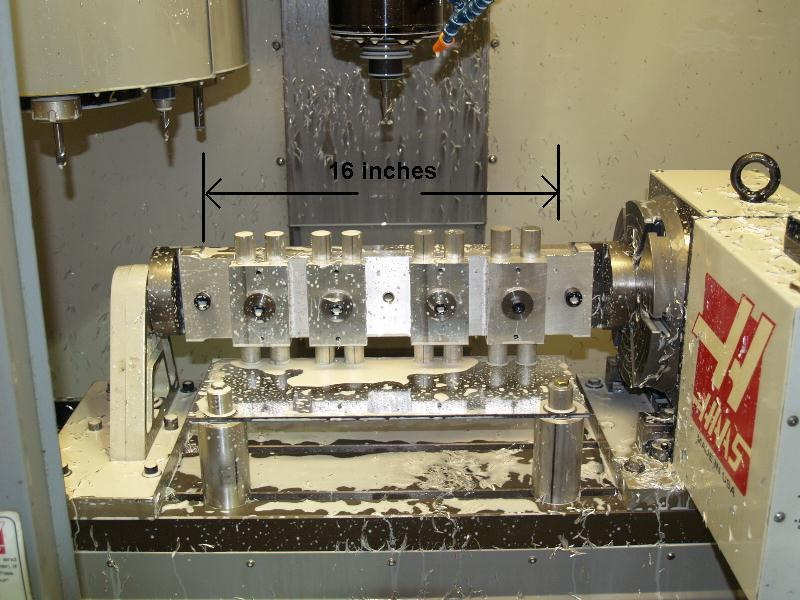
A fixture is a specially designed device that holds and supports a workpiece during a machining operation. In CNC Milling, where movements are automated and depend on precise coordinates, fixtures act as stable anchors that prevent movement or vibration during the cutting cycle.
Fixtures ensure:
- The part is positioned accurately in the X, Y, and Z axes.
- Cutting forces do not shift the workpiece.
- Repeat machining on multiple parts can be done consistently.
- Complex multi-axis CNC Milling operations maintain geometric accuracy.
Unlike manual milling setups, CNC machines rely entirely on programmed coordinates. If the fixture is even slightly off, the machine will faithfully follow the wrong path, producing flawed parts. Thus, proper fixture indication is an indispensable step in preparing for any CNC Milling operation.
Before beginning, gather the right tools to ensure precise alignment and measurement accuracy. Most professional machinists rely on:
- Dial or Test Indicator – Measures alignment deviations to within 0.0001 inches.
- Edge Finder – Locates part edges relative to spindle or tool center.
- Digital Caliper or Micrometer – Confirms part dimensions after setup.
- Alignment Pins or Dowels – Provide repeatable fixture positioning.
- Magnetic Base – Securely holds the indicator during measurement.
- CNC Control Interface – Allows slow, manual spindle jog movements during the indication process.
Each tool serves a specific function in building a precise relationship between the CNC Milling router table, the fixture, and the work coordinate system.
The first rule of CNC Milling setup is cleanliness. Remove debris, coolant residue, or metal chips from both the router table and the bottom of the fixture. Even microscopic burrs can tilt the fixture slightly, creating misalignment that worsens throughout machining. Use compressed air, a brush, and lint-free wipes. Once both surfaces are clean, inspect them visually under good lighting.
Place the fixture roughly in position on the CNC Milling router table using mechanical clamps or T-slot bolts. Tighten evenly and moderately; this ensures the fixture sits flat against the table without warping. For high-precision setups, use locating pins that match existing dowel holes on the table. This enables fast, repeatable setups for future machining runs.
Install a dial indicator onto a magnetic base, or attach it directly to the CNC spindle with a suitable holder. Position the indicator tip to touch the fixture's reference surface, usually an edge or a straight face. Before beginning movement, zero the indicator.
Manually jog the machine spindle along the X-axis while observing the indicator needle. Record the variation. The goal is to minimize the difference between readings at the start and end points. Small mallet taps or fine adjustments with set screws can help correct the alignment. Continue this process until deviation reads nearly zero.
Next, rotate the indicator 90 degrees and sweep the perpendicular side of the fixture along the Y-axis. Adjust as necessary until both axes show minimal deviation. Precision machinists typically aim for an error margin below 0.001 inches.
Use an edge finder or probe to locate the fixture's exact position relative to the machine spindle. Register this position in your CNC controller by setting a work offset (commonly G54). This defines your machining zero and allows the controller to interpret toolpaths accurately.
Remove and reposition the fixture, then recheck alignment by re-indicating. Consistent zero readings confirm your fixture is repeatable. This verification step ensures part uniformity when producing identical batches, a key advantage in CNC Milling production environments.
Professional machinists often use several optimization strategies to achieve even better alignment:
- Elevate the indicator accuracy by using short, rigid holders to minimize deflection.
- Warm up the CNC Milling spindle before measuring to stabilize thermal expansion.
- Record indicator readings in a setup log for quality control.
- Employ precision-ground base plates to ensure perfect contact and reduced measurement error.
- Check Z-axis flatness along with X and Y to confirm full surface coplanarity.
These small but crucial habits substantially improve accuracy over hundreds of production cycles.
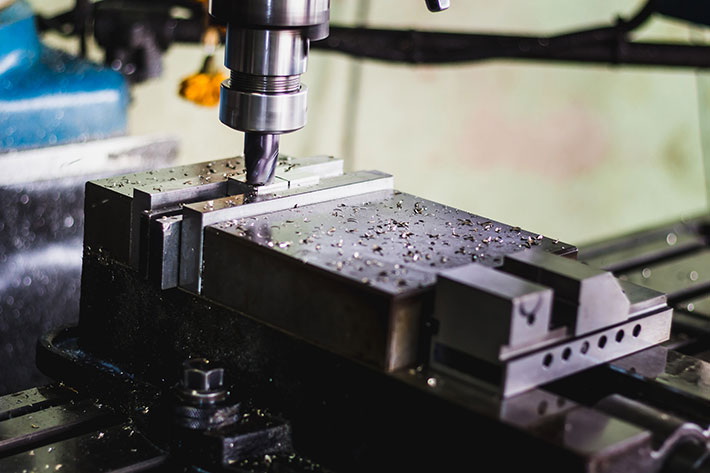
Even small mistakes can accumulate during setup. Below are the most frequent errors to avoid:
- Ignoring table cleanliness: Dirt, oil, or chips under the fixture cause misalignment.
- Uneven bolt tightening: Over-torqueing one side warps the fixture.
- Loose indicator base: Movement of the magnetic stand introduces false readings.
- Skipping perpendicular alignment: Aligning one axis but neglecting the other leads to angular errors.
- No verification after tightening: Clamping sometimes shifts the fixture slightly—always recheck afterward.
By maintaining a disciplined setup process, machinists extend tooling life and ensure accurate CNC Milling results.
As CNC Milling technology advances, newer approaches are replacing manual alignment:
- Electronic Probes: Automatically scan the fixture surface and calculate offsets digitally.
- Laser Alignment Systems: Provide rapid, contact-free detection of misalignment.
- 3D Touch Sensors: Used in high-end 5-axis CNC Milling machines for automatic calibration of rotary fixtures.
- Software Compensation: Some modern CNC control systems allow small positional corrections in the program itself, based on measured offset values.
These automated options dramatically reduce setup time while maintaining precision, particularly for complex or large molds in high-volume CNC Milling production.
Proper fixture indication is the foundation of consistent productivity in CNC machining shops. Every operator knows that misalignment is costly—it wastes raw material, causes longer cycle times, and increases rework. A well-indicated fixture delivers benefits such as:
- Faster setups with fewer iterations.
- Improved product repeatability.
- Minimized dimensional errors.
- Extended tool life due to reduced vibration.
- Better surface finish and tight tolerances.
In industries that depend on CNC Milling—such as aerospace, automotive, medical equipment, and electronics—precision alignment safeguards both profitability and quality assurance.
A fixture that remains in service for extended periods must be properly maintained. Dust accumulation and coolant residue can quickly deteriorate accuracy. Follow these guidelines:
- Clean and inspect the fixture after every production run.
- Polish locating surfaces lightly with stone or abrasive paper to remove burrs.
- Check dowel pins, bushings, and bolts for wear or deformation.
- Lubricate mechanical clamps regularly.
- Store unused fixtures in protective cases or on racks, away from moisture.
Consistent maintenance ensures stable positioning and repeatable accuracy through thousands of CNC Milling operations.
Consider an aluminum sheet router setup using a vacuum-based fixture. In a CNC Milling operation cutting multiple panel shapes, even a 0.5 mm deviation could cause misfit parts. The machinist begins by cleaning the vacuum table, then attaches the fixture and sweeps both X and Y surfaces using a dial indicator. After achieving a deviation under 0.001 inches, he locks the fixture, sets G54 coordinates, and runs a sample part. The resulting product fits perfectly within design tolerances—demonstrating how careful fixture indication directly influences overall part precision.
Safety during setup is equally important as accuracy. Always:
- Keep spindle rotation off while using indicators.
- Wear safety glasses and gloves while handling metal fixtures.
- Avoid using high-speed jogs when measuring with a dial indicator.
- Ensure the table area is clear of coolant spills before starting.
Following proper safety protocols protects both the operator and the precision of the CNC Milling machine.
If the indicator readings fluctuate beyond acceptable limits or alignment seems inconsistent:
1. Check for table warping or damaged fixture base.
2. Verify indicator calibration — faulty instruments give incorrect readings.
3. Assess clamping sequence — uneven torque might distort alignment.
4. Inspect router table surface for wear marks or dents.
5. Ensure spindle runout is within tolerance; excessive play affects measurement.
Resolving these issues maintains calibration consistency across multiple jobs and extends machine tool accuracy over time.
Indicating a fixture on a CNC Milling router table is a core skill for any machinist aiming for precision and repeatability. The process starts with cleaning, then careful alignment of both axes using a dial indicator, followed by zero-point setting and verification. Proper indication guarantees that tool paths correspond perfectly to design geometry, ensuring better product accuracy, faster setups, and reduced tool wear.
In every high-performance CNC Milling environment—from mold production to precision part manufacturing—accurate fixture indication is the difference between average output and world-class results.
Contact us to get more information!
Indicating aligns the fixture perfectly with the CNC machine's coordinate system so that tool paths and part geometry match exactly as programmed.
For standard operations, maintaining alignment within ±0.001 inches is ideal. However, aerospace or medical-grade CNC Milling projects may require even tighter control.
Software can help compensate for minor positional errors, but mechanical indication remains crucial for maintaining absolute geometric accuracy.
Anytime the fixture is removed, reinstalled, or after significant machine maintenance, alignment should be rechecked to ensure precision in ongoing production.
A misaligned fixture leads to uneven cuts, excess vibration, tool wear, and dimensional deviations—ultimately increasing scrap rates and rework costs.
1. https://www.cnccookbook.com/cnc-fixtures-and-workholding
2. https://www.sandvik.coromant.com/en/knowledge/machining/fixturing
3. https://www.machiningcloud.com/blog/cnc-milling-basics-and-setup
4. https://mechanicalbasics.com/how-to-use-dial-indicator-in-cnc-machine
5. https://www.haascnc.com/service/troubleshooting/fixture-alignment-guide.html


