From idea to market-ready product, our NPI solutions make every stage easier, faster. Discover How We Help

Views: 222 Author: Tomorrow Publish Time: 2026-01-22 Origin: Site


Content Menu
● What Is a Macro in CNC Milling?
● Benefits of Macro Programming in CNC Milling
● Key Building Blocks of CNC Milling Macros
● Planning a Macro Program for CNC Milling
● Step-by-Step: How to Create a Simple CNC Milling Macro
>> 1. Set up the program header
>> 2. Declare or assume input variables
>> 4. Implement safety moves and setup
>> 5. Write the cutting loop or sequence
>> 6. Add logic and error checks
>> 7. Finish and return control
● Advanced Techniques for CNC Milling Macros
● Best Practices for CNC Milling Macro Design
● Safety Considerations When Using Macros in CNC Milling
● Common Applications of Macros in CNC Milling
● Avoiding Typical Macro Programming Mistakes in CNC Milling
● Practical Tips for Implementing CNC Milling Macros in a Shop
● FAQ About Macro Programming for CNC Milling
>> 1. What is the difference between a macro and a subprogram in CNC Milling?
>> 2. Which CNC Milling controls support macro programming?
>> 3. How are variables typically used in CNC Milling macros?
>> 4. How do I test a new CNC Milling macro safely?
>> 5. Can macros be combined with CAM output in CNC Milling?
Creating a macro program for CNC Milling is one of the most effective ways to automate repetitive toolpaths, standardize quality, and reduce programming time in a modern machine shop. By combining variables, logic, and loops inside standard G-code, CNC Milling macros let you cut entire families of parts with just a few parameter changes while maintaining high accuracy and process stability.
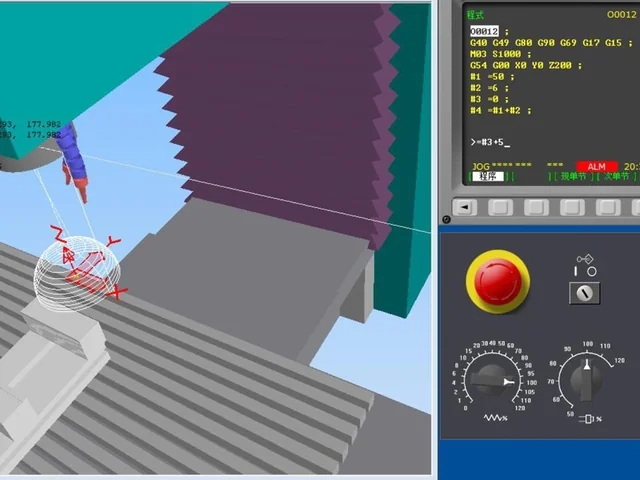
In CNC Milling, a macro is a reusable block of code that uses variables and logical expressions instead of fixed numbers to control tool motion and machining cycles. A CNC Milling macro can store values like hole diameter, pocket depth, coordinates, feed rate, and step-over, then calculate tool positions on the fly every time the macro is called.
Compared with a normal CNC Milling program, a macro behaves more like a small software routine that responds to input values and conditions. This allows CNC Milling shops to automate complex or repetitive operations without rewriting full programs each time and to improve consistency across operators and shifts.
For CNC Milling, macro programming delivers practical advantages that directly impact productivity, flexibility, and safety.
- Reduced programming time: One parametric CNC Milling macro can replace many similar programs for different part sizes or patterns as long as the main geometry is similar.
- Flexible part families: Features like bolt circles, slots, pockets, and chamfers can be standardized and reused across multiple CNC Milling jobs by simply changing variables rather than rewriting code.
- Built-in logic and safety: Conditional checks in CNC Milling macros can verify inputs, limit unsafe moves, monitor tool conditions, and trigger alarms when something is wrong.
- Easier process optimization: When CNC Milling parameters are stored as variables, feeds, speeds, step-downs, and step-overs can be tuned quickly without touching the core motion logic.
- Better standardization: Common shop procedures, from probing cycles to finishing passes, can be captured as approved CNC Milling macros and applied consistently on all machines.
To create a macro program for CNC Milling, it is essential to understand the typical elements supported by common controls such as Fanuc Macro B, Haas, Okuma, and similar systems.
- Variables: CNC Milling macros use local and common variables (often noted as #1, #100, etc.. to store dimensional values, counters, flags, and results of calculations.
- Expressions and math: Arithmetic and trigonometric functions let the CNC Milling macro calculate coordinates, depths, pitches, and angles based on current variable values.
- Logic (IF, GOTO.: Conditional statements allow the CNC Milling program to branch, skip blocks, or trigger alarms when certain conditions are met or violated.
- Looping (WHILE/DO, repeat counters.: Repetitive CNC Milling operations, such as drilling a pattern of holes or machining multiple pockets, can be executed with loops instead of copying many nearly identical lines.
- Subprogram calls and returns: Many controls treat CNC Milling macros as subprograms, called from a main program using codes like M98 and M99, sometimes with repeat counts for flexible repetition.
Every control has its own syntax and system variable map, so any CNC Milling macro must be checked against the specific control manual before use.
Before writing a macro for CNC Milling, a clear planning stage avoids confusion and reduces time spent debugging.
1. Define the machining task
Decide what repetitive CNC Milling operation the macro will automate, such as a bolt circle, rectangular pocket, chamfering cycle, engraving pattern, or probing routine. Clarify whether the macro will run as a sub-routine from a main CNC Milling program or as a stand-alone cycle selectable by the operator.
2. Identify required input variables
List all dimensions and process parameters needed by the CNC Milling macro, such as X/Y center, hole diameter, depth, pitch, step-over, and feed rate. Decide which variables the operator must set at the control and which can use default values, so CNC Milling operators know exactly what must be entered before running.
3. Choose coordinate and reference strategy
Decide whether the CNC Milling macro will use absolute positioning (G90. or incremental positioning (G91. as its primary mode. Standardize reference points so that the macro behaves consistently for every CNC Milling setup, typically relative to a work offset such as G54 or another fixture offset.
4. Plan safety and recovery
Include safe Z moves, tool length compensation, and clear retract positions inside the CNC Milling macro to minimize collision risk. Consider adding checks that stop the CNC Milling program or skip operations if variables are out of allowed ranges or if certain conditions are not satisfied.
5. Define naming and documentation rules
Use clear comments at the top of the CNC Milling macro to describe its purpose, required variables, units, and any assumptions. Standard naming and documentation make it easier for others in the CNC Milling shop to reuse and maintain your macro library.
The basic workflow for writing a macro program for CNC Milling is similar across most controls, even if the detailed syntax differs.
Assign a program number reserved for macro use in your CNC Milling control and add a descriptive title comment. For example, you might create program O9001 with a comment that clearly states it is a bolt circle macro for CNC Milling.
Decide which variable numbers will hold the CNC Milling parameters. For instance, #100 might be the number of holes, #101 the bolt circle diameter, #102 the hole depth, #103 the feed rate, and #104 the starting angle. Document these assignments with comments so CNC Milling operators know exactly how to call and configure the macro.
Use arithmetic expressions to calculate values that depend on the inputs, such as angle increments or radius positions. For a CNC Milling bolt circle macro, a common approach is to calculate the increment as 360 divided by the number of holes, then use trigonometric functions to generate X/Y coordinates on the fly based on the bolt circle radius and current angle.
At the start of the CNC Milling macro, set modal states like plane selection, positioning mode, and tool compensation as needed. Include rapid moves to a safe clearance plane and confirm the correct spindle state and coolant status before starting the cutting motions.
Build a loop that repeats the drilling or milling steps for each location. Inside the loop, calculate new positions from angle and radius, move the CNC Milling tool to the new position, perform the drilling or milling cycle, and then update variables for the next iteration. Keep the loop logic straightforward so that other programmers can quickly understand and modify it.
Use IF statements to verify that values like number of holes, diameter, or depth are positive, and that step-over or pitch is within safe limits. If an unsafe or impossible value is detected, the CNC Milling macro can branch to an error message, stop the spindle, or simply skip the operation to protect the machine and part.
At the end of the macro, retract the tool to a safe clearance height, cancel any temporary modes if necessary, and use the appropriate return command (often M99. so that control returns to the calling CNC Milling program. Ensure the macro leaves the machine in a predictable state so subsequent operations remain consistent.
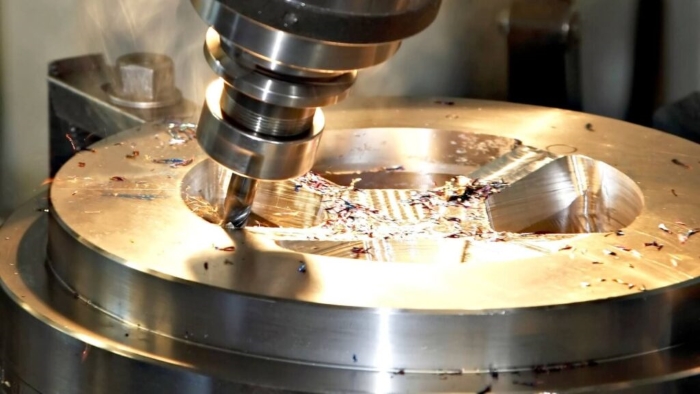
Once basic CNC Milling macros are working reliably, more advanced techniques can expand their capabilities.
- Adaptive step-down and step-over: By linking step-down or step-over to tool diameter or material type, you can create CNC Milling macros that automatically choose more conservative or aggressive cuts.
- Material-based parameter sets: Storing feeds and speeds in dedicated variables makes it possible to use the same CNC Milling macro for steels, aluminum, and plastics by changing a small set of material variables.
- Conditional feature machining: Macros can decide whether to machine optional features, such as extra holes or slots, based on flags set by the operator in variables. This allows a single CNC Milling macro to cover multiple part options in one file.
- Integration with probing: Combined with probing cycles, CNC Milling macros can measure real-world positions and then adjust toolpaths or offsets automatically based on the measured values.
Well-designed CNC Milling macros are easier to debug, reuse, and share across machines and teams.
- Consistent variable usage: Establish a clear standard for variable ranges used by CNC Milling macros in your shop, such as using #100–#199 for user input and #500+ for system or persistent values.
- Thorough commenting: Add concise comments describing each major step, variable purpose, and formula so that new CNC Milling staff can understand the logic without guesswork.
- Modular structure: Break large CNC Milling routines into multiple smaller macros, each with a focused purpose, and then call them from a main macro or main program.
- Controlled updates: When changing a CNC Milling macro, document the revision date, author, and reason. Save previous versions in case you need to revert.
- Shop-wide standards: Create internal guidelines on how to name CNC Milling macros, how to manage versions, and how to qualify a new macro before using it on production parts.
Because CNC Milling macros can move tools automatically through loops and conditions, safety must always be a priority.
- Always verify new macros with a dry run or air cut above the workpiece, using conservative feeds, slow rapid rates if possible, and minimal depths until motion is confirmed.
- Check that all CNC Milling macros start and end in known safe positions, including a clear retract Z and avoidance of clamps, fixtures, and machine limits.
- Do not allow untrained operators to modify critical macro variables or logic; restrict editing privileges and protect important CNC Milling macro programs with passwords if the control supports it.
- Regularly inspect macro libraries for obsolete, untested, or duplicated CNC Milling macros that may cause confusion or errors. Remove or clearly label outdated versions.
Macro programs are widely used to streamline frequently repeated CNC Milling tasks and complex geometries.
- Hole patterns and bolt circles: One macro can generate bolt circles, grids, slots, or custom hole arrays in a wide range of CNC Milling jobs by changing pitch, count, and diameter.
- Pocketing and profiling: Parametric programs can mill rectangular, circular, or slot-type pockets with variable sizes and step-downs, which is ideal for flexible CNC Milling production where part sizes vary.
- Probing and setup: Many CNC Milling users rely on macros for automated workpiece probing, origin finding, and tool length measurement to reduce manual setup time.
- Engraving and marking: Text engraving or serial numbering can be handled by CNC Milling macros that generate characters or patterns based on input strings or counters.
- Tool life management: Macros can track tool usage, count cycles, and trigger automatic tool changes or alarms within CNC Milling routines when a tool reaches its life limit.
Macro programming for CNC Milling is powerful, but mistakes can lead to wasted parts or even damage.
- Uninitialized variables: Never assume variables contain safe values; always assign or verify them before using them inside CNC Milling motion commands.
- Missing safety moves: Skipping clearance moves or failing to retract before looping to the next position increases collision risk, especially when parts or fixtures vary.
- Over-complex logic: Trying to handle too many scenarios in one CNC Milling macro can make it hard to read and debug. When the logic becomes complicated, split it into multiple smaller macros.
- Ignoring control differences: Copying macros between different CNC Milling controls without checking G-code dialect, system variables, and supported functions can cause serious errors.
- Poor documentation: Lack of clear comments and instructions forces others to guess how a CNC Milling macro works, which often leads to incorrect variable settings and failed jobs.
To get real value from CNC Milling macros, they should be treated as strategic assets, not just quick one-off tricks.
- Start with high-impact use cases such as frequently repeated bolt circles, pocket patterns, and probing routines that appear across many jobs.
- Involve both programmers and experienced operators when designing CNC Milling macros so the logic matches real shop practices and fixture strategies.
- Create a shared macro library on each control or a network location, and ensure everyone knows how to access approved CNC Milling macros and documentation.
- Train new programmers specifically on macro concepts, variable usage, and safety, using simple CNC Milling examples before moving to more complex routines.
- Periodically review macro performance and feedback from the shop floor, then refine CNC Milling macros based on real production experience.
Macro programming transforms everyday CNC Milling from a set of fixed G-code files into a flexible, parametric system that responds to dimensions, options, and logic at run time. By mastering variables, math, conditions, and loops, programmers can create CNC Milling macros that reduce setup effort, standardize common cycles, and greatly speed up programming for part families and recurring features. When planned carefully, documented clearly, and tested safely, macro programs become a long-term asset that keeps CNC Milling operations agile, efficient, and competitive.
Contact us to get more information!
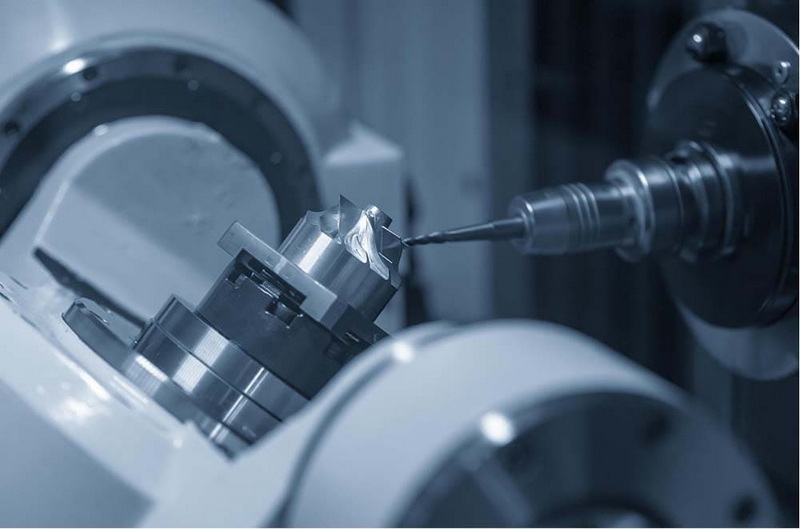
In CNC Milling, a subprogram is usually a fixed sequence of G-code that can be called multiple times but still relies on hard-coded coordinates and values. A macro, by contrast, combines subprogram concepts with variables, math, and logic so that one CNC Milling routine can adapt to different dimensions and patterns without editing the code itself.
Many modern CNC Milling controls support some form of macro or parametric programming, including Fanuc Macro B, Haas, Okuma User Task, and various OEM implementations. However, each control has unique system variables, function syntax, and limits, so CNC Milling programmers must consult the specific control manual before writing or transferring macros.
Variables in CNC Milling macros store dimensions, offsets, tool data, loop counters, feed rates, and calculation results that drive tool motion and logic. During execution, the CNC Milling control replaces each variable reference with its current value, allowing the same macro to run with different settings across many parts and fixtures.
To test a new CNC Milling macro, begin with an air cut well above the workpiece, using conservative feeds, slow rapids when possible, and shallow depths. It is also a good idea to simulate the CNC Milling program if your CAM system or controller supports it and to verify variable values and loop counts before moving to full-depth cutting on real parts.
Yes, many shops integrate custom macros with CAM-generated toolpaths to standardize repetitive setup or finishing operations in CNC Milling. CAM output may call shop-specific macros for probing, chamfer cycles, corner rounding, or standard patterns, allowing CNC Milling programmers to keep posts simpler while still benefiting from powerful parametric routines.
1. https://www.amcomanufacturing.com/intro-to-macro-programming
2. https://www.fictiv.com/articles/cnc-machining-macros-subprograms-and-parametric-programming
3. https://www.cnccookbook.com/cnc-g-code-macro-conditions-looping/
4. https://gcodetutor.com/cnc-macro-programming.html
5. https://machiningblog.com/home/cnc-macro-programming-basics
6. https://www.practicalmachinist.com/forum/threads/macro-programming-fundamentals.167395/
7. https://woodweb.com/knowledge_base/Parametric_Code_Examples_for_CNC.html
8. https://cnccookbook.com/cnc-macro-programming-fanuc-macro-b/
9. https://cncmakers.com/cnc/Tech_Support/Fanuc_Macro_examples.html


