From idea to market-ready product, our NPI solutions make every stage easier, faster. Discover How We Help

Views: 222 Author: Tomorrow Publish Time: 2026-01-12 Origin: Site


Content Menu
● Zero Return (Homing) All Axes
● Checking Machine Status And Warm-Up
● Loading Tools And Setting Tool Offsets
● Securing The Workpiece And Setting Work Offsets
● Loading And Verifying The CNC Program
● Starting The First Machining Cycle
● Shutting Down The Mori CNC Mill
● Common Startup Mistakes To Avoid
● FAQ
>> 1. What is the first thing to do before starting a Mori CNC mill?
>> 2. Why is zero return (homing) necessary on Mori CNC machines?
>> 3. How should tools be set up when starting a new job?
>> 4. What is the safest way to run a new program for the first time?
>> 5. How should a Mori CNC mill be shut down after work?
Starting up a Mori Seiki (DMG Mori) CNC milling machine safely and correctly is essential for accurate machining and long-term machine reliability. This guide walks through each step from power-on to running a program, in a way that suits most Mori CNC mills with Fanuc or MAPPS controls.[1][2][3]

Before touching the power switch, confirm the basic safety conditions.[2]
- Check that all guards, doors, and interlocks are in place and functioning properly.[2]
- Remove loose tools, gauges, and scrap from the table and inside the enclosure to prevent collisions.[3]
- Verify lubrication levels (way lube, hydraulic oil if equipped, spindle chiller if present) according to the machine manual.[2]
- Ensure air supply pressure and quality meet the specifications on the Mori machine's nameplate or manual.[4]
- Keep the emergency stop (E-stop) button location in mind and test that it is not mechanically stuck.[2]
Most Mori CNC milling machines use a two-stage power-on process: main breaker and control power.[1][2]
- Turn on the main disconnect/breaker on the electrical cabinet; confirm fans and control power lights come up.[1]
- Release any pressed emergency stop buttons by twisting or pulling, depending on the model.[3]
- Press the machine “POWER ON” or “CONTROL ON” button on the operator panel to boot the CNC control.[2]
- Wait for the control to complete the boot sequence and clear any basic alarms such as door open or low air pressure.[3]
After every full power-off, the machine must be referenced so the control knows actual axis positions.[5][3]
- Select the ZERO RETURN or HOME mode on the Mori/Fanuc mode selector.[5][3]
- Home the Z-axis first by holding the plus direction key until the axis reaches its reference switch and stops.[3]
- Repeat for X- and Y-axes so all linear axes show machine zero coordinates on the position screen.[5][3]
- Confirm no zero-return related alarms remain; if they do, follow the Mori service manual procedure for zero-return adjustment rather than forcing motion.[6][5]
A brief warm-up reduces thermal drift and distributes lubrication.[7][4]
- Verify that all required auxiliary systems (lubrication unit, spindle chiller, hydraulic unit if used) show normal status on the control or indicator lights.[4][2]
- Run the built-in warm-up program if supplied by Mori, or jog the axes through their travel and run the spindle at low to moderate speed for several minutes.[7][3]
- Monitor for abnormal noises, vibration, or alarms during warm-up before continuing to production speeds.[7]
Correct tool setup is critical before starting any cutting operation.[8][3]
- Load toolholders into the magazine or spindle according to your setup sheet, ensuring each tool location matches the program's tool numbers.[8]
- Use JOG/HANDLE mode to bring each tool to a tool setter or reference surface and measure length (and diameter if needed), then store values in the tool offset table.[8][3]
- Double-check that the active tool number in the offset table corresponds to the physical tool in the spindle or pocket.[8]
Workholding and work offsets define where the part sits relative to machine zero.[7][3]
- Mount the workpiece in a vise, fixture, or on the table using appropriate clamping torque and support.[7]
- In JOG mode, use incremental jog and then the handwheel to approach the workpiece reference features (edge, corner, or center) as defined in your CAM setup.[3]
- Set the work coordinate system (G54–G59, etc.) on the offset screen so the current machine position becomes the part zero for X, Y, and Z.[3]
- Record and verify work offset values against the setup sheet to avoid crashes when running the program.[7][3]

A verified program and correct mode selection prevent many startup problems.[7][3]
- Load the NC program via USB, network, or memory card into the Mori control's memory, ensuring the program number matches your documentation.[9][3]
- Open the program on the control and visually check for correct tool calls, spindle directions, coolant commands, and work offset calls.[7]
- Run a graphic simulation or dry-run feature (if available) to detect major errors without cutting material.[3][7]
- Keep feed and spindle overrides turned down (for example 10–50%) for the first trial run.[7]
Once the machine is homed, warmed, and set up, the first cycle can be started.[3][7]
- Set the mode to AUTO or MEMORY so the control executes the loaded part program automatically.[3][7]
- Position the tool safely above the part using JOG or single-block run-in, then confirm coolant is either M-code controlled or manually switched on if required.[7][3]
- Press CYCLE START and keep a hand near the feed-hold and emergency stop buttons while closely watching the first toolpath moves.[3][7]
- Use single-block mode and optional stop for first-time production to verify each tool call and motion block before allowing continuous running.[7][3]
Good monitoring protects both the machine and the part.[4][7]
- Watch spindle load, axis load, and vibration; adjust feed override if loads approach unsafe levels for tooling or workholding.[7]
- Confirm chips are evacuating effectively and that coolant flow keeps cutting edges covered where required.[4][7]
- Respond to alarms promptly by pressing feed-hold or emergency stop as needed, then read the alarm description in the Mori/Fanuc alarm screen and follow the manual's corrective steps.[4][2]
A controlled shutdown helps maintain machine accuracy and reliability.[2][3]
- After the last cycle, retract the tool to a safe position and send the machine to a designated park or machine-zero location.[3]
- Turn off spindle and coolant, then cancel tool length and work offsets as per shop procedures.[2]
- Exit AUTO mode, press emergency stop if required by local policy, then use the control's power-off function to shut down the CNC.[2][3]
- Open the main disconnect or breaker only after the control has completely powered down.[2]
Avoiding frequent errors saves time and prevents damage.[3][7]
- Forgetting zero return, which causes position errors and potential axis overtravel alarms.[5][3]
- Starting a program with the wrong work offset (for example, G55 instead of G54), leading to offsets in X, Y, and Z.[7]
- Using incorrect or missing tool length offsets, which is a major cause of crashes into the workpiece or table.[8][3]
- Running full feed and spindle overrides on a new program without a prior dry run or simulation.[7]
Starting up a Mori CNC milling machine correctly means following a disciplined sequence: safety checks, power-on, zero return, warm-up, tooling and work setup, program verification, and cautious first cuts. When this routine becomes standard practice, machine uptime increases, part quality improves, and the risk of costly crashes or downtime is significantly reduced. Always supplement these general steps with the specific Mori Seiki operation manual for your exact model and control configuration.[4][2][3][7]
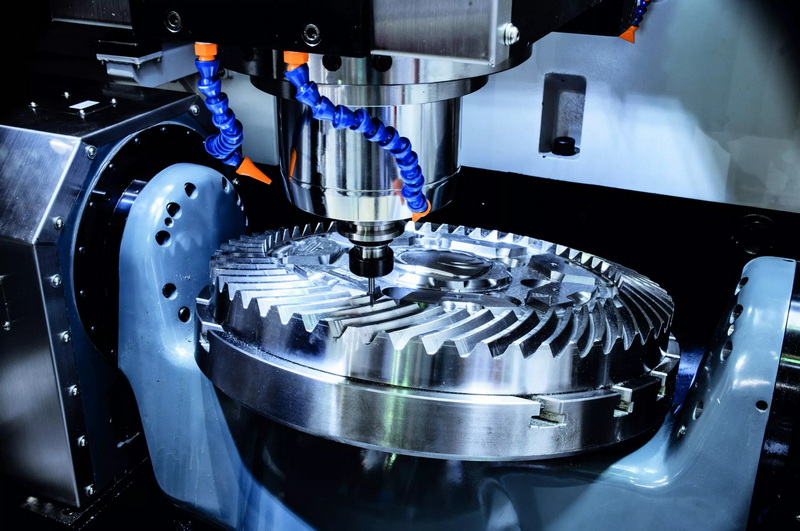
The first task is to perform safety checks: confirm guards and doors are closed, air and lubrication are within specification, and the work area is clear of loose objects. Only after these checks should the main power and control power be turned on.[1][4][2]
Zero return sets a known reference so the control can relate encoder counts to actual machine coordinates, which is essential for precise positioning. Without homing, the CNC may misinterpret axis positions and trigger overtravel alarms or cause unexpected motion during program execution.[5][3]
Each tool must be loaded in the correct pocket and measured for length (and diameter when necessary) using a tool setter or reference surface. These measurements are stored in the tool offset table so the program's Z depths and XY paths match the physical cutting geometry.[8][3]
Use graphic simulation or dry-run mode if available, then execute the program in AUTO mode with single-block and optional stop turned on while feed overrides are reduced. This method allows checking every tool call and motion block before committing to full-speed cutting.[3][7]
After the last part, retract the tool, stop spindle and coolant, and move the axes to a safe or home position. Then power down the CNC control using its soft power-off function before switching off the main disconnect, following the machine's operation manual.[2][3]
[1](https://www.youtube.com/watch?v=qzSP37AASaE)
[2](https://www.mexil.hu/uploads/termek/30/79e1c96a6cfeeee5.pdf)
[3](https://www.youtube.com/watch?v=_rThvuAcVD0)
[4](https://www.asset-trade.de/sites/default/files/media/productdocument/asset-trade-mori-seiki-nzs1500-operation-manual-asset-trade.pdf)
[5](https://en.industryarena.com/forum/fanuc-zero-return-procedure-sharing--479401.html)
[6](https://www.scribd.com/document/536701739/Adjustment-Procedure-of-Y-axis-Zero-Return-Position-NHX4000)
[7](https://www.machinestation.us/how-do-i-load-and-run-a-cnc-program/)
[8](https://www.scribd.com/document/347825342/CNC-Machining-Manual)
[9](https://www.youtube.com/watch?v=FTpRNcnTyXM)
[10](https://www.practicalmachinist.com/forum/threads/basic-startup-procedure-for-mori-seiki-sl1a.294247/)
[11](https://www.youtube.com/watch?v=WqAYqR3G828)
[12](https://www.facebook.com/groups/769782850345135/posts/1745663672757043/)
[13](https://www.youtube.com/watch?v=8YceDA_2bWw)
[14](https://www.remontservo.ru/ufa/pages/publications/article-610/img-article/Mori-Seiki-SLSeries-Programming-Manua-l2008PMNLTMSC518I1ENL12002H02.pdf)
[15](https://www.coursehero.com/file/66448340/SE-NL251TR01-03-Adjustment-of-Zero-Return-Position-for-Turretpdf/)


